• What is your Google Play system update date?

    From Maria Sophia@[email protected] to comp.mobile.android on Mon Mar 9 01:45:45 2026
    From Newsgroup: comp.mobile.android

    My Samsung Galaxy A32-5G (Android 13) APEX listing shows a full set of
    Google Mainline modules, but my Google Play system update date is stuck at
    June 1, 2023 when viewed by System > About phone > Software information

    If you have a Samsung, what is your Google Play system update date?
    Are all Samsung's frozen? Or just mine?

    I ran Termux & looked at the /system/apex directory...

    $ cd /system
    /system $ cd apex
    /system/apex $ dir
    com.android.apex.cts.shim.apex
    com.android.btservices.apex
    com.android.i18n.apex
    com.android.runtime.apex
    com.android.uwb.capex
    com.android.vndk.current.apex
    com.android.wifi.capex
    com.google.android.adbd_compressed.apex com.google.android.adservices_compressed.apex com.google.android.appsearch_compressed.apex com.google.android.art_compressed.apex com.google.android.cellbroadcast_compressed.apex com.google.android.conscrypt_compressed.apex com.google.android.extservices_compressed.apex com.google.android.ipsec_compressed.apex com.google.android.media.swcodec_compressed.apex com.google.android.media_compressed.apex com.google.android.mediaprovider_compressed.apex com.google.android.neuralnetworks_compressed.apex com.google.android.ondevicepersonalization_compressed.apex com.google.android.os.statsd_compressed.apex com.google.android.permission_compressed.apex com.google.android.resolv_compressed.apex com.google.android.scheduling_compressed.apex com.google.android.sdkext_compressed.apex com.google.android.tethering_compressed.apex
    com.google.android.tzdata4.apex
    com.google.mainline.primary.libs.apex
    com.samsung.android.ipm.apex
    com.samsung.android.shell.apex
    com.samsung.android.spqr.apex
    /system/apex $

    Apparently these are the baseline Android components: com.android.btservices.apex - Bluetooth stack
    com.android.i18n.apex - internationalization libraries
    com.android.runtime.apex - ART runtime (Dalvik/ART) com.android.vndk.current.apex - vendor compatibility libraries com.android.wifi.capex - Wi-Fi stack
    com.android.uwb.capex - ultra-wideband stack (if hardware present) com.android.apex.cts.shim.apex - compatibility shim
    Apparently those are not updated through Google Play on Samsung.
    They update only through Samsung firmware OTAs

    Apparently these are Google Mainline APEX modules com.google.android.adbd_compressed.apex - ADB daemon com.google.android.adservices_compressed.apex - Privacy Sandbox ad services com.google.android.appsearch_compressed.apex - on-device search index com.google.android.art_compressed.apex - ART runtime (Google version) com.google.android.cellbroadcast_compressed.apex - emergency alerts com.google.android.conscrypt_compressed.apex - TLS/SSL crypto provider com.google.android.extservices_compressed.apex - text classification /
    smart actions
    com.google.android.ipsec_compressed.apex - VPN/IPsec stack com.google.android.media_compressed.apex - media framework com.google.android.media.swcodec_compressed.apex - software codecs com.google.android.mediaprovider_compressed.apex - media indexing com.google.android.neuralnetworks_compressed.apex - NNAPI com.google.android.ondevicepersonalization_compressed.apex - ODP personalization engine
    com.google.android.os.statsd_compressed.apex - system telemetry com.google.android.permission_compressed.apex - permission enforcement com.google.android.resolv_compressed.apex - DNS resolver com.google.android.scheduling_compressed.apex - job scheduler com.google.android.sdkext_compressed.apex - SDK extensions com.google.android.tethering_compressed.apex - tethering stack com.google.android.tzdata4.apex - time zone data com.google.mainline.primary.libs.apex - shared libraries for Mainline

    Apparently these are Samsung-specific system components: com.samsung.android.ipm.apex - Samsung Intelligent Performance Manager com.samsung.android.shell.apex - Samsung shell environment com.samsung.android.spqr.apex - Samsung security/privilege framework
    These are apparently unique to Samsung and replace some Google behaviors

    In summary, apparently the APEX modules exist in /system/apex/.
    a. They load normally at boot.
    b. But they never update through Google Play.
    Apparently, they only update when Samsung pushes a full firmware OTA.

    Are my APEX modules frozen because Samsung freezes them, or because I
    disabled something? What matters is what other Samsungs show.
    --- Synchronet 3.21d-Linux NewsLink 1.2
  • From AJL@[email protected] to comp.mobile.android on Mon Mar 9 16:10:09 2026
    From Newsgroup: comp.mobile.android

    On 3/9/26 1:45 AM, Maria Sophia wrote:
    My Samsung Galaxy A32-5G (Android 13) APEX listing shows a full set of
    Google Mainline modules, but my Google Play system update date is stuck at >June 1, 2023 when viewed by System > About phone > Software information


    If you have a Samsung, what is your Google Play system update date?
    Are all Samsung's frozen? Or just mine?

    This Samsung Galaxy A11+ tablet I'm posting with says November 1, 2025.


    I ran Termux & looked at the /system/apex directory...

    $ cd /system
    /system $ cd apex
    /system/apex $ dir
    com.android.apex.cts.shim.apex
    com.android.btservices.apex
    com.android.i18n.apex
    com.android.runtime.apex
    com.android.uwb.capex
    com.android.vndk.current.apex
    com.android.wifi.capex
    com.google.android.adbd_compressed.apex >com.google.android.adservices_compressed.apex >com.google.android.appsearch_compressed.apex >com.google.android.art_compressed.apex >com.google.android.cellbroadcast_compressed.apex >com.google.android.conscrypt_compressed.apex >com.google.android.extservices_compressed.apex >com.google.android.ipsec_compressed.apex >com.google.android.media.swcodec_compressed.apex >com.google.android.media_compressed.apex >com.google.android.mediaprovider_compressed.apex >com.google.android.neuralnetworks_compressed.apex >com.google.android.ondevicepersonalization_compressed.apex >com.google.android.os.statsd_compressed.apex >com.google.android.permission_compressed.apex >com.google.android.resolv_compressed.apex >com.google.android.scheduling_compressed.apex >com.google.android.sdkext_compressed.apex >com.google.android.tethering_compressed.apex
    com.google.android.tzdata4.apex
    com.google.mainline.primary.libs.apex
    com.samsung.android.ipm.apex
    com.samsung.android.shell.apex
    com.samsung.android.spqr.apex
    /system/apex $

    Apparently these are the baseline Android components: >com.android.btservices.apex - Bluetooth stack
    com.android.i18n.apex - internationalization libraries >com.android.runtime.apex - ART runtime (Dalvik/ART) >com.android.vndk.current.apex - vendor compatibility libraries >com.android.wifi.capex - Wi-Fi stack
    com.android.uwb.capex - ultra-wideband stack (if hardware present) >com.android.apex.cts.shim.apex - compatibility shim
    Apparently those are not updated through Google Play on Samsung.
    They update only through Samsung firmware OTAs

    Apparently these are Google Mainline APEX modules >com.google.android.adbd_compressed.apex - ADB daemon >com.google.android.adservices_compressed.apex - Privacy Sandbox ad services >com.google.android.appsearch_compressed.apex - on-device search index >com.google.android.art_compressed.apex - ART runtime (Google version) >com.google.android.cellbroadcast_compressed.apex - emergency alerts >com.google.android.conscrypt_compressed.apex - TLS/SSL crypto provider >com.google.android.extservices_compressed.apex - text classification /
    smart actions
    com.google.android.ipsec_compressed.apex - VPN/IPsec stack >com.google.android.media_compressed.apex - media framework >com.google.android.media.swcodec_compressed.apex - software codecs >com.google.android.mediaprovider_compressed.apex - media indexing >com.google.android.neuralnetworks_compressed.apex - NNAPI >com.google.android.ondevicepersonalization_compressed.apex - ODP >personalization engine
    com.google.android.os.statsd_compressed.apex - system telemetry >com.google.android.permission_compressed.apex - permission enforcement >com.google.android.resolv_compressed.apex - DNS resolver >com.google.android.scheduling_compressed.apex - job scheduler >com.google.android.sdkext_compressed.apex - SDK extensions >com.google.android.tethering_compressed.apex - tethering stack >com.google.android.tzdata4.apex - time zone data >com.google.mainline.primary.libs.apex - shared libraries for Mainline

    Apparently these are Samsung-specific system components: >com.samsung.android.ipm.apex - Samsung Intelligent Performance Manager >com.samsung.android.shell.apex - Samsung shell environment >com.samsung.android.spqr.apex - Samsung security/privilege framework
    These are apparently unique to Samsung and replace some Google behaviors

    In summary, apparently the APEX modules exist in /system/apex/.
    a. They load normally at boot.
    b. But they never update through Google Play.
    Apparently, they only update when Samsung pushes a full firmware OTA.

    Are my APEX modules frozen because Samsung freezes them, or because I >disabled something? What matters is what other Samsungs show.


    --- Synchronet 3.21d-Linux NewsLink 1.2
  • From David Oseas@doseas{nospam}@usa.net to comp.mobile.android on Mon Mar 9 09:51:38 2026
    From Newsgroup: comp.mobile.android

    On 3/9/2026 1:45 AM, Maria Sophia wrote:
    My Samsung Galaxy A32-5G (Android 13) APEX listing shows a full set of
    Google Mainline modules, but my Google Play system update date is stuck at June 1, 2023 when viewed by System > About phone > Software information

    If you have a Samsung, what is your Google Play system update date? Are
    all Samsung's frozen? Or just mine?


    I'm on February 1, 2026 on both my S23 phone & A9+ tablet.

    I've had to do manual Play System updates for a while -- to do so, click
    on the words "Google Play system update" on the screen displaying the
    Play System version.

    -David
    --- Synchronet 3.21d-Linux NewsLink 1.2
  • From Andy Burns@[email protected] to comp.mobile.android on Mon Mar 9 17:50:53 2026
    From Newsgroup: comp.mobile.android

    Maria Sophia wrote:

    My Samsung Galaxy A32-5G (Android 13) APEX listing shows a full set of
    Google Mainline modules, but my Google Play system update date is stuck at June 1, 2023 when viewed by System > About phone > Software information

    If you have a Samsung, what is your Google Play system update date? Are
    all Samsung's frozen? Or just mine?

    My Galaxy Tab S10 FE is on 1st Feb 2026 (actually newer than my Pixel 8a
    1st Nov 2025)

    Are my APEX modules frozen because Samsung freezes them, or because I disabled something? What matters is what other Samsungs show.

    I though Samsung admitted they had a problem with Play
    updates a few months ago? But mine seems to have got over that ...


    --- Synchronet 3.21d-Linux NewsLink 1.2
  • From AJL@[email protected] to comp.mobile.android on Mon Mar 9 18:03:22 2026
    From Newsgroup: comp.mobile.android

    On 3/9/26 9:51 AM, David Oseas wrote:
    On 3/9/2026 1:45 AM, Maria Sophia wrote:
    My Samsung Galaxy A32-5G (Android 13) APEX listing shows a full set of
    Google Mainline modules, but my Google Play system update date is stuck at >> June 1, 2023 when viewed by System > About phone > Software information

    If you have a Samsung, what is your Google Play system update date? Are
    all Samsung's frozen? Or just mine?


    I'm on February 1, 2026 on both my S23 phone & A9+ tablet.

    I've had to do manual Play System updates for a while -- to do so, click
    on the words "Google Play system update" on the screen displaying the
    Play System version.


    Interesting. On my Samsung tablet I didn't realize that was a button cause
    it had the date info displayed on it. When I pushed it, it updated from
    November 1, 2025 to February 1, 2026. Wonder why it's not automatic? Weird.
    Thanks.


    -David


    --- Synchronet 3.21d-Linux NewsLink 1.2
  • From Maria Sophia@[email protected] to comp.mobile.android on Mon Mar 9 12:54:14 2026
    From Newsgroup: comp.mobile.android

    AJL wrote:
    I'm on February 1, 2026 on both my S23 phone & A9+ tablet.

    I've had to do manual Play System updates for a while -- to do so, click >>on the words "Google Play system update" on the screen displaying the
    Play System version.


    Interesting. On my Samsung tablet I didn't realize that was a button cause
    it had the date info displayed on it. When I pushed it, it updated from
    November 1, 2025 to February 1, 2026. Wonder why it's not automatic? Weird.
    Thanks.

    Thanks for that information from AJL & David Oseas as it shows that the
    "Google Play system update" is updating on both your Samsung devices.

    On my Android 13 Samsung Galaxy A32-5G, longpressing on the "Google Play
    system update" in the Settings > About phone > Software information doesn't
    do anything but of course, my April 2021 SM-A326U phone is out of support.
    Android Security Patch Level = February 1, 2025

    But wait!
    Don't *all* Android 10+ phones (get monthly) Project Mainline updates?

    What's the date on your /system/apex files?
    Mine appear to be frozen in time...
    Termux> ls -l /system/apex
    com.google.android.adbd_compressed.apex Dec 31,2008
    com.google.android.adservices_compressed.apex Dec 31,2008
    com.google.android.appsearch_compressed.apex Dec 31,2008
    etc.

    The reason I ask the question is that it appears that my Samsung Galaxy
    A32-5G (which is no longer fully supported) is NOT getting the Project
    Mainline APEX (Android Pony Express) modules that I thought *all* Android
    10+ phones are getting. They exist for sure, but they're not ever updated.

    The whole point of Project Mainline was to improve security-patch speed and reduce reliance on OEM full-system updates, yet, mine isn't updating.

    It could be something I did though, since everyone else's Google Play
    services update (so far) is newer than mine, as mine has never updated.

    Can others, especially AJL who just updated today, check their dates?
    Termux> ls -l /system/apex
    Or, if you don't have termux:
    adb shell ls -l /system/apex

    The reason I ask is I'm assuming if Mainline is working, then the Google
    APEX modules will have recent timestamps (most likely with date stamps
    matching the Google Play system update date).
    --- Synchronet 3.21d-Linux NewsLink 1.2
  • From AJL@[email protected] to comp.mobile.android on Mon Mar 9 20:21:23 2026
    From Newsgroup: comp.mobile.android

    On 3/9/26 12:54 PM, Maria Sophia wrote:
    AJL wrote:
    I'm on February 1, 2026 on both my S23 phone & A9+ tablet.

    I've had to do manual Play System updates for a while -- to do so, click >>>on the words "Google Play system update" on the screen displaying the >>>Play System version.


    Interesting. On my Samsung tablet I didn't realize that was a button cause >> it had the date info displayed on it. When I pushed it, it updated from
    November 1, 2025 to February 1, 2026. Wonder why it's not automatic? Weird. >> Thanks.

    Thanks for that information from AJL & David Oseas as it shows that the >"Google Play system update" is updating on both your Samsung devices.

    On my Android 13 Samsung Galaxy A32-5G, longpressing on the "Google Play >system update" in the Settings > About phone > Software information doesn't >do anything but of course, my April 2021 SM-A326U phone is out of support.
    Android Security Patch Level = February 1, 2025

    But wait!
    Don't *all* Android 10+ phones (get monthly) Project Mainline updates?

    What's the date on your /system/apex files?
    Mine appear to be frozen in time...
    Termux> ls -l /system/apex
    com.google.android.adbd_compressed.apex Dec 31,2008
    com.google.android.adservices_compressed.apex Dec 31,2008
    com.google.android.appsearch_compressed.apex Dec 31,2008
    etc.


    The reason I ask the question is that it appears that my Samsung Galaxy >A32-5G (which is no longer fully supported) is NOT getting the Project >Mainline APEX (Android Pony Express) modules that I thought *all* Android
    10+ phones are getting. They exist for sure, but they're not ever updated.

    Well... I went and pushed that magic button on my 6 year old Samsung Galaxy
    S10+ (Android 12) and darned if it didn't also update to February 1, 2026.
    Again it seems weird that the "security" Play System update (listed under
    Biomentrics and Security on this phone) didn't automatically update being
    that it was obviously available...


    The whole point of Project Mainline was to improve security-patch speed and >reduce reliance on OEM full-system updates, yet, mine isn't updating.

    It could be something I did though, since everyone else's Google Play >services update (so far) is newer than mine, as mine has never updated.

    Can others, especially AJL who just updated today, check their dates?
    Termux> ls -l /system/apex
    Or, if you don't have termux:
    adb shell ls -l /system/apex

    The reason I ask is I'm assuming if Mainline is working, then the Google
    APEX modules will have recent timestamps (most likely with date stamps >matching the Google Play system update date).


    --- Synchronet 3.21d-Linux NewsLink 1.2
  • From Maria Sophia@[email protected] to comp.mobile.android on Mon Mar 9 13:30:17 2026
    From Newsgroup: comp.mobile.android

    Andy Burns wrote:
    If you have a Samsung, what is your Google Play system update date? Are
    all Samsung's frozen? Or just mine?

    My Galaxy Tab S10 FE is on 1st Feb 2026 (actually newer than my Pixel 8a
    1st Nov 2025)

    Are my APEX modules frozen because Samsung freezes them, or because I
    disabled something? What matters is what other Samsungs show.

    I though Samsung admitted they had a problem with Play
    updates a few months ago? But mine seems to have got over that ...

    Hi Andy,

    Thanks for that information, where, according to David Oseas, you might
    have to manually click on the 'Google Play system update' to update.

    Mine does nothing when I click it, but I'm no longer in support either.
    My "Android security patch level" is February 1, 2025

    The reason it matters is, as you know, Project Mainline is "supposed" to be updating all Android 10+ phones monthly over the Internet.

    My system definitely has (an old version of the) APEX modules:

    adb shell ls -l /system/apex
    -rw-r--r-- 1 root root 315392 2008-12-31 07:00 com.android.apex.cts.shim.apex
    -rw-r--r-- 1 root root 21892767 2008-12-31 07:00 com.android.btservices.apex
    -rw-r--r-- 1 root root 38404504 2008-12-31 07:00 com.android.i18n.apex
    -rw-r--r-- 1 root root 9188272 2008-12-31 07:00 com.android.runtime.apex
    etc.
    And my system is definitely mounting the APEX modules at runtime:
    adb shell mount | grep apex
    tmpfs on /apex type tmpfs (rw,seclabel,nosuid,nodev,noexec,relatime,size=1692972k,nr_inodes=423243,mode=755)
    /dev/block/loop5 on /apex/com.android.runtime@1 type ext4 (ro,dirsync,seclabel,nodev,noatime,i_version)
    /dev/block/loop5 on /apex/com.android.runtime type ext4 (ro,dirsync,seclabel,nodev,noatime,i_version)
    /dev/block/loop6 on /apex/com.samsung.android.shell@333746501 type ext4 (ro,dirsync,seclabel,nodev,noatime,i_version)
    etc.
    /dev/block/dm-44 on /apex/com.android.adservices@331814200 type ext4 (ro,dirsync,seclabel,nodev,noatime,i_version)
    /dev/block/dm-46 on /apex/com.android.appsearch type ext4 (ro,dirsync,seclabel,nodev,noatime,i_version)
    /dev/block/dm-45 on /apex/com.android.mediaprovider@331812020 type ext4 (ro,dirsync,seclabel,nodev,noatime,i_version)
    etc.
    Apparently they are all coming from static loop images baked into
    Samsung's firmware, and not from updated Google Mainline modules.

    Given that this is apparently the above distinction:
    /dev/block/dm-X === APEX modules delivered via Mainline
    /dev/block/loopX === APEX images baked into the system partition

    My Google Mainline modules (ART, media, IPsec, tethering, etc.) are mounted from dm-* devices, but the timestamps in /system/apex are ancient, meaning they've never been updated.

    In reality, my system is so bastardized that it's not important what mine
    shows but it is *very important* what other people's systems show.

    On a device that is receiving Mainline updates, the following should occur:
    1. /system/apex/com.google.android.*.apex timestamps
    should be recent (2025-2026).
    2. The Google Play system update date should advance monthly.
    3. The dm-verity mounts should correspond to updated payloads

    But maybe, since it's a read-only file system, the time stamps are wrong? Termux$ ls -l /apex
    ls: cannot open directory '/apex': Permission denied
    Termux$ ls -l /system/apex
    total 207520
    -rw-r--r-- 1 root root 315392 Dec 31 2008 com.android.apex.cts.shim.apex
    -rw-r--r-- 1 root root 21892767 Dec 31 2008 com.android.btservices.apex
    -rw-r--r-- 1 root root 38404504 Dec 31 2008 com.android.i18n.apex
    etc.

    Apparently, I don't have access to the mounted APEX modules under /apex. (which, apparently, is where the active versions live).
    Apparently I only see the factory APEX images under /system/apex.

    So I can't get the apex version codes, but on a Pixel this should work
    adb shell cmd apex list
    com.android.art
    com.android.media
    com.android.permission
    com.android.tethering
    etc.
    adb shell cmd apex info com.android.art
    name=com.android.art
    versionCode=331813010
    versionName=13
    isActive=true
    isFactory=false

    Apparently Pixels expose APEX modules under /apex, so this should work.
    adb shell cat /apex/com.android.art/apex_manifest.json
    {
    "name": "com.android.art",
    "version": 331813010,
    "versionName": "13"
    }

    None of that works on Samsungs as far as I know though.

    My main issue here, is whether Project Mainline is working or not.
    Not for me, since it could be something that I did.

    But for everyone else.
    We need to PROVE that project mainline is doing its thing.


    --- Synchronet 3.21d-Linux NewsLink 1.2
  • From Maria Sophia@[email protected] to comp.mobile.android on Mon Mar 9 13:39:29 2026
    From Newsgroup: comp.mobile.android

    AJL wrote:
    Well... I went and pushed that magic button on my 6 year old Samsung Galaxy
    S10+ (Android 12) and darned if it didn't also update to February 1, 2026.
    Again it seems weird that the "security" Play System update (listed under
    Biomentrics and Security on this phone) didn't automatically update being
    that it was obviously available...

    Thanks AJL for confirming that the magic button is working on an Android 12 S10+, since what matters most for this thread isn't my own phone (as I
    could have broken something) but what happens on everyone else's phone.

    I'm trying to prove whether or not Project Mainline is working.
    I'm sure it is.

    But I'd like to see proof that Mainline is updating APEX modules monthly.
    And I think you showed good evidence, even if it may not be proof, per se.

    In a test I just ran (in response to Andy's post), I "think" my Galaxy
    doesn't expose the /apex mount point (only the /system/apex copy), so it's
    hard for me to tell what the actual versions are on my APEX modules.

    Only the Pixels know for sure. :)

    Just to be clear, I don't really care about my phone, (as it's very likely
    I broke something long ago), but what I do care very much about is how to
    tell EXACTLY if Project Mainline is updating monthly everyone's modules.

    So far, it seems that, (by all account?), the "Google Play system update" button doesn't work automagically, but maybe a reboot would do it too?
    --- Synchronet 3.21d-Linux NewsLink 1.2
  • From Andy Burns@[email protected] to comp.mobile.android on Mon Mar 9 22:01:26 2026
    From Newsgroup: comp.mobile.android

    Maria Sophia wrote:

    I'm trying to prove whether or not Project Mainline is working.
    I'm sure it is.
    But I'd like to see proof that Mainline is updating APEX modules monthly.

    I'll fire up my "spare" Pixel3, which is long past its official support
    life (I think as often with google, it got a couple of "late" updates
    after the 3 year lifetime, which now 7 years for newer Pixels and Samsungs).

    --- Synchronet 3.21d-Linux NewsLink 1.2
  • From Jeff Layman@[email protected] to comp.mobile.android on Mon Mar 9 22:08:31 2026
    From Newsgroup: comp.mobile.android

    On 09/03/2026 08:45, Maria Sophia wrote:
    My Samsung Galaxy A32-5G (Android 13) APEX listing shows a full set of
    Google Mainline modules, but my Google Play system update date is stuck at June 1, 2023 when viewed by System > About phone > Software information

    If you have a Samsung, what is your Google Play system update date?
    Are all Samsung's frozen? Or just mine?

    (snip)
    Is there anything of interest to you here? <https://android.gadgethacks.com/news/android-play-system-update-shows-2024-google-explains/>
    --
    Jeff
    --- Synchronet 3.21d-Linux NewsLink 1.2
  • From AJL@[email protected] to comp.mobile.android on Mon Mar 9 22:41:56 2026
    From Newsgroup: comp.mobile.android

    On 3/9/26 1:39 PM, Maria Sophia wrote:
    AJL wrote:
    Well... I went and pushed that magic button on my 6 year old Samsung Galaxy >> S10+ (Android 12) and darned if it didn't also update to February 1, 2026. >> Again it seems weird that the "security" Play System update (listed under >> Biomentrics and Security on this phone) didn't automatically update being >> that it was obviously available...

    Thanks AJL for confirming that the magic button is working on an Android 12 >S10+, since what matters most for this thread isn't my own phone (as I
    could have broken something) but what happens on everyone else's phone.

    I'm trying to prove whether or not Project Mainline is working.
    I'm sure it is.

    But I'd like to see proof that Mainline is updating APEX modules monthly.
    And I think you showed good evidence, even if it may not be proof, per se.

    In a test I just ran (in response to Andy's post), I "think" my Galaxy >doesn't expose the /apex mount point (only the /system/apex copy), so it's >hard for me to tell what the actual versions are on my APEX modules.

    Only the Pixels know for sure. :)

    Just to be clear, I don't really care about my phone, (as it's very likely
    I broke something long ago), but what I do care very much about is how to >tell EXACTLY if Project Mainline is updating monthly everyone's modules.


    So far, it seems that, (by all account?), the "Google Play system update" >button doesn't work automagically, but maybe a reboot would do it too?

    Dunno. In its youth IIRC Samsung occasionally required my Galaxy S10+ to
    update and reboot. However in recent times it hasn't requested such. I'm
    Probablly derelect in not just doing it periodically myself. Resolution:
    I'll start. This Chromebook I'm posting with is 3 years old now and it
    still bugs me when an update is needed. Dunno about the Play System though
    as it's not listed in settings even though the Chromebook runs Android (I'm
    posting with an Android app). But then from what I read Chromebooks as I
    know them are on their way out and that nasty OS Android will be taking
    them over...


    --- Synchronet 3.21d-Linux NewsLink 1.2
  • From Maria Sophia@[email protected] to comp.mobile.android on Mon Mar 9 15:50:51 2026
    From Newsgroup: comp.mobile.android

    Jeff Layman wrote:
    Is there anything of interest to you here? <https://android.gadgethacks.com/news/android-play-system-update-shows-2024-google-explains/>

    Hi Jeff,

    Thanks for that article, which seems to partly explain what's going on.

    My main goal was just to figure out how to *prove* that Project Mainline
    was working, but then it got complicated 'cuz the Galaxy doesn't show
    what's in /apex (while the Pixels apparently do show what is in /apex), so
    I'm not sure if Project Mainline is working or not on my modified Samsung.

    I'm not sure what the "version" of Google Play system update means with respect to Project Mainline, so your article is helpful in that regard.

    *Android Play System Update Shows 2024? Google Explains (Feb 6, 2026)*
    <https://android.gadgethacks.com/news/android-play-system-update-shows-2024-google-explains/>

    Apparently the date in Settings > Security > Google Play system update reflects the timestamp of just one specific module file and worse,
    (verbatim) "The situation gets even more complex when you consider that Samsung has been blocking Play system updates for months following major Android updates, a pattern that has reportedly persisted for years"

    All I'm really trying to do is determine how to tell, for sure, that
    Project Mainline is updating modules monthly, on any given Android device.

    My assumption was that I could check the date stamps (or version data)
    on the APEX (Android pony express) modules, but apparently Samsung's don't allow permission in /apex (where apparently the Pixels do allow it).

    I was also hoping that the Google Play system update date would be
    useful in that regard, but apparently, based on the article you kindly unearthed, that may not be as meaningful as I might have hoped it to be.
    --- Synchronet 3.21d-Linux NewsLink 1.2
  • From Maria Sophia@[email protected] to comp.mobile.android on Mon Mar 9 16:10:05 2026
    From Newsgroup: comp.mobile.android

    AJL wrote:
    So far, it seems that, (by all account?), the "Google Play system update" >>button doesn't work automagically, but maybe a reboot would do it too?

    Dunno. In its youth IIRC Samsung occasionally required my Galaxy S10+ to
    update and reboot. However in recent times it hasn't requested such. I'm
    Probablly derelect in not just doing it periodically myself. Resolution:
    I'll start. This Chromebook I'm posting with is 3 years old now and it
    still bugs me when an update is needed. Dunno about the Play System though
    as it's not listed in settings even though the Chromebook runs Android (I'm
    posting with an Android app). But then from what I read Chromebooks as I
    know them are on their way out and that nasty OS Android will be taking
    them over...

    Interesting that folks have to "push the button" to get the Google Play
    system update to update, as we'd all think it should be automatic.

    Even worse if you have to reboot in order to get it to be automatic.

    The whole point of my action was to prove, for sure, that Project Mainline
    was updating my phone monthly (and yours, and everyone else's phone too!).

    However, in one way, my system is the wrong one to test because it's highly modified, although, in another way, it's the perfect system to test 'cuz I don't have the google play store app, nor do I have a google account set up
    on the phone, so if my phone is updating monthly, then yours is too! :)

    Since I can't read what's in /apex (apparently Pixels can), I can only look
    at my "staging" area in /system/apex, but those files have very old dates,
    so that tells me almost nothing of value on my Samsung device.

    As a compromise, I started looking at the date for the google play system update, which is when I realized mine is really off kilter compared to
    everyone else's. Then Jeff pointed out that the google Play system update
    date is the date of only a single file - which - gets even more complicated since it's a different file on each device apparently. Sheesh. So complex.

    The date shown in Settings > Security > Google Play system update
    apparently comes from the timestamp of the "APEX session" responsible for
    the last successfully applied Mainline module.

    Hence, it is not the newest module on the device because it's the one that
    last triggered a system-level session commit. Apparently that means the displayed date corresponds to one specific APEX module, but which one
    varies by device, OEM, and update sequence. OMG. Can't they make it easy?

    Apparently, the date is tied to the last module that required a reboot to finalize, because only those modules create a system-level "session" that updates the global timestamp of the Google Play system update button.

    These are the modules that most often require a reboot, apparently:
    com.android.runtime.apex - ART (Android Runtime)
    com.android.conscrypt.apex - TLS/SSL security provider
    com.android.media.apex - media codecs
    com.android.permission.apex - permission controller
    com.android.adbd.apex - ADB daemon
    com.android.os.statsd.apex - stats daemon

    But wait. It gets worse.

    On Pixels, apparently the date often corresponds to ART or Conscrypt.
    But on Samsung devices, it is apparently Conscrypt or Permission because Samsung blocks or delays ART updates after major One UI releases.

    At least there is a Venn overlap with com.android.conscrypt.apex

    Apparently, pressing the Google Play system update button works because it triggers Android's Mainline update client to run a forced check-and-apply
    cycle for modular APEX/APK components.

    Apparently, pressing that button contacts Google's update servers and asks
    for any pending APEX or APK-based Mainline modules. It then attempts to
    install any modules that it downloaded or which were previously downloaded
    but no "commit" step occurred.

    What's that commit step?
    Hell if I know, but it seems to be one of two actions for sure:
    1. If the user reboots, or,
    2. If the user manually triggers that update.

    In summary, apparently, the reason people are seeing updates happen when
    they press the Google Play system update button is that there are two steps
    1. Download
    2. Apply (or reboot)

    Hence, the "Google Play system update" date is not the date of all modules.
    It is the date of the last APEX module that successfully committed.

    Why is this so complicated. It should be more intuitive. Sigh.

    --- Synchronet 3.21d-Linux NewsLink 1.2
  • From Maria Sophia@[email protected] to comp.mobile.android on Mon Mar 9 16:17:43 2026
    From Newsgroup: comp.mobile.android

    Andy Burns wrote:
    I'm trying to prove whether or not Project Mainline is working.
    I'm sure it is.
    But I'd like to see proof that Mainline is updating APEX modules monthly.

    I'll fire up my "spare" Pixel3, which is long past its official support
    life (I think as often with google, it got a couple of "late" updates
    after the 3 year lifetime, which now 7 years for newer Pixels and Samsungs).

    I just found out that there are two steps to a Google Play system update.
    1. Download
    2. Apply (either by rebooting or by pressing the GPSU button)

    So maybe you can try this sequence to help prove what does the commit.

    0. Do not press the Play system update button.
    1. Write down the date shown at
    Settings > Security > Google Play system update
    Do not press the Play system update button.
    2. Reboot the phone normally.
    3. After the reboot finishes, go back to the same screen
    to check whether the date changed.
    4. If the date did not change, now press that
    Google Play system update button and let it run.
    5. Check the date again after pressing the button.
    6. If the date only changes after pressing the button,
    then updates are applied only when the button is pressed.
    But if the date changes after reboot, then updates are
    applied automatically at boot.
    --- Synchronet 3.21d-Linux NewsLink 1.2
  • From AJL@[email protected] to comp.mobile.android on Tue Mar 10 01:43:48 2026
    From Newsgroup: comp.mobile.android

    On 3/9/26 4:10 PM, Maria Sophia wrote:
    AJL wrote:
    So far, it seems that, (by all account?), the "Google Play system update" >>>button doesn't work automagically, but maybe a reboot would do it too?

    Dunno. In its youth IIRC Samsung occasionally required my Galaxy S10+ to
    update and reboot. However in recent times it hasn't requested such. I'm
    Probablly derelect in not just doing it periodically myself. Resolution:
    I'll start. This Chromebook I'm posting with is 3 years old now and it
    still bugs me when an update is needed. Dunno about the Play System though >> as it's not listed in settings even though the Chromebook runs Android (I'm >> posting with an Android app). But then from what I read Chromebooks as I
    know them are on their way out and that nasty OS Android will be taking
    them over...

    Interesting that folks have to "push the button" to get the Google Play >system update to update, as we'd all think it should be automatic.

    Even worse if you have to reboot in order to get it to be automatic.

    The whole point of my action was to prove, for sure, that Project Mainline >was updating my phone monthly (and yours, and everyone else's phone too!).

    However, in one way, my system is the wrong one to test because it's highly >modified, although, in another way, it's the perfect system to test 'cuz I >don't have the google play store app, nor do I have a google account set up >on the phone, so if my phone is updating monthly, then yours is too! :)

    Since I can't read what's in /apex (apparently Pixels can), I can only look >at my "staging" area in /system/apex, but those files have very old dates,
    so that tells me almost nothing of value on my Samsung device.

    As a compromise, I started looking at the date for the google play system >update, which is when I realized mine is really off kilter compared to >everyone else's. Then Jeff pointed out that the google Play system update >date is the date of only a single file - which - gets even more complicated >since it's a different file on each device apparently. Sheesh. So complex.

    The date shown in Settings > Security > Google Play system update
    apparently comes from the timestamp of the "APEX session" responsible for
    the last successfully applied Mainline module.

    Hence, it is not the newest module on the device because it's the one that >last triggered a system-level session commit. Apparently that means the >displayed date corresponds to one specific APEX module, but which one
    varies by device, OEM, and update sequence. OMG. Can't they make it easy?

    Apparently, the date is tied to the last module that required a reboot to >finalize, because only those modules create a system-level "session" that >updates the global timestamp of the Google Play system update button.

    These are the modules that most often require a reboot, apparently:
    com.android.runtime.apex - ART (Android Runtime)
    com.android.conscrypt.apex - TLS/SSL security provider
    com.android.media.apex - media codecs
    com.android.permission.apex - permission controller
    com.android.adbd.apex - ADB daemon
    com.android.os.statsd.apex - stats daemon

    But wait. It gets worse.

    On Pixels, apparently the date often corresponds to ART or Conscrypt.
    But on Samsung devices, it is apparently Conscrypt or Permission because >Samsung blocks or delays ART updates after major One UI releases.

    At least there is a Venn overlap with com.android.conscrypt.apex

    Apparently, pressing the Google Play system update button works because it >triggers Android's Mainline update client to run a forced check-and-apply >cycle for modular APEX/APK components.

    Apparently, pressing that button contacts Google's update servers and asks >for any pending APEX or APK-based Mainline modules. It then attempts to >install any modules that it downloaded or which were previously downloaded >but no "commit" step occurred.

    What's that commit step?
    Hell if I know, but it seems to be one of two actions for sure:
    1. If the user reboots, or,
    2. If the user manually triggers that update.

    In summary, apparently, the reason people are seeing updates happen when
    they press the Google Play system update button is that there are two steps
    1. Download
    2. Apply (or reboot)

    Hence, the "Google Play system update" date is not the date of all modules. >It is the date of the last APEX module that successfully committed.

    Why is this so complicated. It should be more intuitive. Sigh.

    I would say for us less technical folks it definitely should be more
    automatic. I don't keep sensitive stuff on my 6 year old Samsung phone
    because I don't expect security on it to be up to date. Likewise my other
    lower Android versioned toys. However I do (did?) expect it of this brand
    new Android 16 Samsung tablet. It brags about automatic updates for 6
    years. And so I do keep sensitive stuff on it. Thus finding something on it
    that needs a manual update is a bit disconcerting even though it is
    explained away by some website...


    --- Synchronet 3.21d-Linux NewsLink 1.2
  • From Jeff Layman@[email protected] to comp.mobile.android on Tue Mar 10 12:55:10 2026
    From Newsgroup: comp.mobile.android

    On 09/03/2026 22:50, Maria Sophia wrote:
    Jeff Layman wrote:
    Is there anything of interest to you here?
    <https://android.gadgethacks.com/news/android-play-system-update-shows-2024-google-explains/>

    Hi Jeff,

    Thanks for that article, which seems to partly explain what's going on.

    My main goal was just to figure out how to *prove* that Project Mainline
    was working, but then it got complicated 'cuz the Galaxy doesn't show
    what's in /apex (while the Pixels apparently do show what is in /apex), so I'm not sure if Project Mainline is working or not on my modified Samsung.

    I'm not sure what the "version" of Google Play system update means with respect to Project Mainline, so your article is helpful in that regard.

    *Android Play System Update Shows 2024? Google Explains (Feb 6, 2026)*
    <https://android.gadgethacks.com/news/android-play-system-update-shows-2024-google-explains/>

    Apparently the date in Settings > Security > Google Play system update reflects the timestamp of just one specific module file and worse,
    (verbatim) "The situation gets even more complex when you consider that Samsung has been blocking Play system updates for months following major Android updates, a pattern that has reportedly persisted for years"

    All I'm really trying to do is determine how to tell, for sure, that
    Project Mainline is updating modules monthly, on any given Android device.

    My assumption was that I could check the date stamps (or version data)
    on the APEX (Android pony express) modules, but apparently Samsung's don't allow permission in /apex (where apparently the Pixels do allow it).

    Sorry, but way above my Android knowledge level. On my Xiaomi, Total
    Commander shows many entries in system/apex/..., and all of them are
    dated 01/01/2009. It's Android 13, and according to Settings the last
    security update was 1 Sept 2023.

    Is there anything in the App Manager which might be of use to you? I see
    that it gives the date of installation and the date of the latest update
    for all apps.

    I was also hoping that the Google Play system update date would be
    useful in that regard, but apparently, based on the article you kindly unearthed, that may not be as meaningful as I might have hoped it to be.
    --
    Jeff
    --- Synchronet 3.21d-Linux NewsLink 1.2
  • From Andy Burns@[email protected] to comp.mobile.android on Tue Mar 10 13:28:29 2026
    From Newsgroup: comp.mobile.android

    Jeff Layman wrote:

    It's Android 13, and according to Settings the last security update was
    1 Sept 2023.

    Google Play system updates continue after android security updates are finished for a given model.
    --- Synchronet 3.21d-Linux NewsLink 1.2
  • From Jeff Layman@[email protected] to comp.mobile.android on Tue Mar 10 15:31:47 2026
    From Newsgroup: comp.mobile.android

    On 10/03/2026 13:28, Andy Burns wrote:
    Jeff Layman wrote:

    It's Android 13, and according to Settings the last security update was
    1 Sept 2023.

    Google Play system updates continue after android security updates are finished for a given model.

    Interesting. I just checked in "Settings" again and under Google Play
    system update it stated 1 November 2025. When I clicked on the arrow
    next to that it showed "Restart to update. Your device needs to restart
    to complete the process".

    I didn't do anything, so it restarted itself. It now says the Google
    Play system update is 1 February 2026.
    --
    Jeff
    --- Synchronet 3.21d-Linux NewsLink 1.2
  • From Frank Slootweg@[email protected] to comp.mobile.android on Tue Mar 10 15:43:03 2026
    From Newsgroup: comp.mobile.android

    Maria Sophia wrote:
    [...]

    On my Android 13 Samsung Galaxy A32-5G, longpressing on the "Google Play system update" in the Settings > About phone > Software information doesn't do anything but of course, my April 2021 SM-A326U phone is out of support. Android Security Patch Level = February 1, 2025

    If you *really* do a longpress, then indeed nothing happens, because
    you should just *tap* on the "Google Play system update" message.

    FYI, on my wife's out-of-support (Android 13) A51 (probably older
    than your A32-5G) it was November 1, 2023 and - just now - after
    downloading and '[Restart now]' it's February 1, 2026!

    [...]
    --- Synchronet 3.21d-Linux NewsLink 1.2
  • From Maria Sophia@[email protected] to comp.mobile.android on Tue Mar 10 08:48:03 2026
    From Newsgroup: comp.mobile.android

    Jeff Layman wrote:
    It's Android 13, and according to Settings the last security update was
    1 Sept 2023.

    Google Play system updates continue after android security updates are
    finished for a given model.

    Interesting. I just checked in "Settings" again and under Google Play
    system update it stated 1 November 2025. When I clicked on the arrow
    next to that it showed "Restart to update. Your device needs to restart
    to complete the process".

    I didn't do anything, so it restarted itself. It now says the Google
    Play system update is 1 February 2026.

    Hi Jeff,

    My original goal is/was simply to "prove" what Andy said is correct! :)

    For sure, theoretically, Andy is correct that the specific Google Play
    system updates are intended to work for... well, um, er... for forever.
    /apex/{all these files will be the Project Mainline updated modules}

    But, if that's happening on your phone, and on mine, why is our Google Play system update version so old? I don't know, but verbatim in your article is <https://android.gadgethacks.com/news/android-play-system-update-shows-2024-google-explains/>
    "The date you see in settings reflects a component file timestamp"

    The date that matters are the dates of the /apex/*.{apex} files, but my
    Samsung won't allow Termux to see into that directory. My Samsung Termux
    can only see into the /system/apex directory, which is only a staging area.

    Having said that, I can see why you may have confused the "security update" with the "Google Play system update" because even the guy who wrote that article you referenced confused the two. As Andy said, they're different.
    a. You get security updates for a while, but,
    b. You get Google Play system updates, for forever.

    All I'm trying to do is prove (b) above!

    To that end...
    Maybe Andy can do a Pixel "ls -l" inside of Termux pointed to /apex?
    --- Synchronet 3.21d-Linux NewsLink 1.2
  • From Maria Sophia@[email protected] to comp.mobile.android on Tue Mar 10 09:01:36 2026
    From Newsgroup: comp.mobile.android

    AJL wrote:
    Hence, the "Google Play system update" date is not the date of all modules. >>It is the date of the last APEX module that successfully committed.

    Why is this so complicated. It should be more intuitive. Sigh.

    I would say for us less technical folks it definitely should be more
    automatic. I don't keep sensitive stuff on my 6 year old Samsung phone
    because I don't expect security on it to be up to date. Likewise my other
    lower Android versioned toys. However I do (did?) expect it of this brand
    new Android 16 Samsung tablet. It brags about automatic updates for 6
    years. And so I do keep sensitive stuff on it. Thus finding something on it
    that needs a manual update is a bit disconcerting even though it is
    explained away by some website...

    Hi AJL,

    I agree with you that it should be "automatic", but apparently it's not.

    Since others have seen the same thing, we're pretty sure now, by joint experience anyway, that the Google Play system update must be proceeding in
    two distinct stages, one of which is manual, which isn't intuitive to us.

    Stage 1: Google Play system update silently downloads modules into a
    staging area (which appears to change depending on the OEM).
    (maybe /data/apex/sessions/?)

    Stage 2: But it requires a reboot for those /apex files to be mounted
    <https://android.googlesource.com/platform/system/apex/+/refs/heads/android11-mainline-permission-release/docs/>
    "If an APEX is present in a built-in partition, the APEX can
    be updated by providing an APEX package with the same package
    name and a higher version code. The new APEX is stored in /data
    and, similar to APKs, the newer version shadows the version
    already present in the built-in partition. But unlike APKs,
    the newer version of the APEX is only activated after reboot."

    It would be nice to know if we can figure out how to access those
    apex files because that alone would be proof Project Mainline works.
    --- Synchronet 3.21d-Linux NewsLink 1.2
  • From AJL@[email protected] to comp.mobile.android on Tue Mar 10 16:38:45 2026
    From Newsgroup: comp.mobile.android

    On 3/10/26 9:01 AM, Maria Sophia wrote:
    AJL wrote:
    Hence, the "Google Play system update" date is not the date of all modules. >>>It is the date of the last APEX module that successfully committed.

    Why is this so complicated. It should be more intuitive. Sigh.

    I would say for us less technical folks it definitely should be more
    automatic. I don't keep sensitive stuff on my 6 year old Samsung phone
    because I don't expect security on it to be up to date. Likewise my other >> lower Android versioned toys. However I do (did?) expect it of this brand >> new Android 16 Samsung tablet. It brags about automatic updates for 6
    years. And so I do keep sensitive stuff on it. Thus finding something on it >> that needs a manual update is a bit disconcerting even though it is
    explained away by some website...

    Hi AJL,

    I agree with you that it should be "automatic", but apparently it's not.

    Since others have seen the same thing, we're pretty sure now, by joint >experience anyway, that the Google Play system update must be proceeding in >two distinct stages, one of which is manual, which isn't intuitive to us.

    Stage 1: Google Play system update silently downloads modules into a
    staging area (which appears to change depending on the OEM).
    (maybe /data/apex/sessions/?)

    Stage 2: But it requires a reboot for those /apex files to be mounted
    <https://android.googlesource.com/platform/system/apex/+/refs/heads/android11-mainline-permission-release/docs/>
    "If an APEX is present in a built-in partition, the APEX can
    be updated by providing an APEX package with the same package
    name and a higher version code. The new APEX is stored in /data
    and, similar to APKs, the newer version shadows the version
    already present in the built-in partition. But unlike APKs,
    the newer version of the APEX is only activated after reboot."

    It would be nice to know if we can figure out how to access those
    apex files because that alone would be proof Project Mainline works.

    I'll leave that stuff to you technical folks. If I mess too much with the
    innards on this thing I'll likely just make things worse.

    BTW I complained earlier about my PhoNews newsreader having problems running
    on Android 16. But in the last week or so it's been working fine. Dunno
    what changed. But for those looking for a newsreader it appears to again be
    worth the 2 buck...

    --- Synchronet 3.21d-Linux NewsLink 1.2
  • From Maria Sophia@[email protected] to comp.mobile.android on Tue Mar 10 09:41:23 2026
    From Newsgroup: comp.mobile.android

    Frank Slootweg wrote:
    On my Android 13 Samsung Galaxy A32-5G, longpressing on the "Google Play
    system update" in the Settings > About phone > Software information doesn't >> do anything but of course, my April 2021 SM-A326U phone is out of support. >> Android Security Patch Level = February 1, 2025

    If you *really* do a longpress, then indeed nothing happens, because
    you should just *tap* on the "Google Play system update" message.

    FYI, on my wife's out-of-support (Android 13) A51 (probably older
    than your A32-5G) it was November 1, 2023 and - just now - after
    downloading and '[Restart now]' it's February 1, 2026!

    Hi Frank,

    Thanks for being kind and helpful, where I would have said what you said if
    I didn't remember, that, long ago, I disabled 'something' that killed the Google Play system updates - but I don't remember what it was I killed.

    I can longpress forever and nothing happens, but that's not really
    important to the group simply because my phone is set up differently.

    I don't recall the exact steps, but long ago I was experimenting with
    disabling the Google Play system update, and, well, it must have worked.

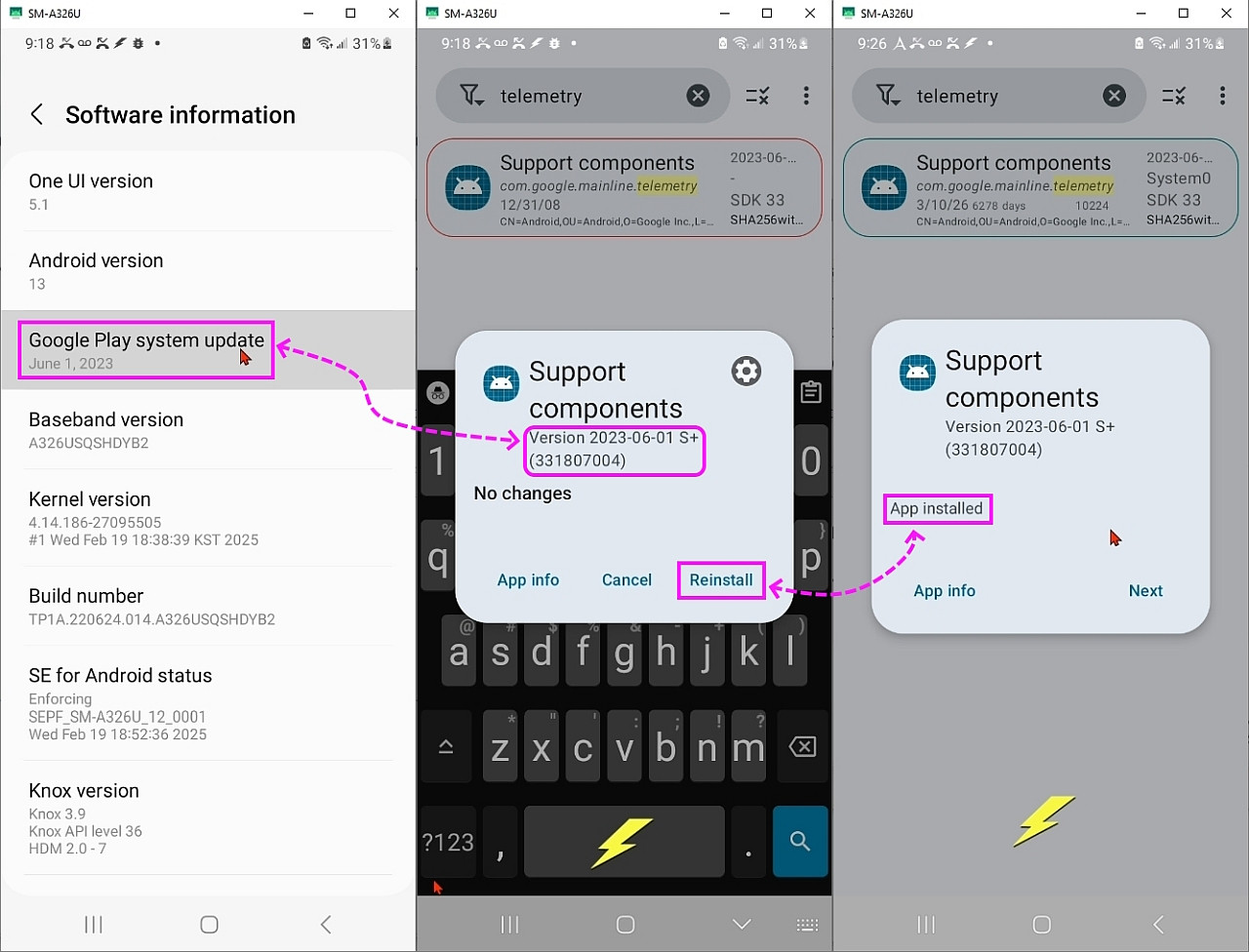
    Looking way back into the archives, I see I've wiped out telemetry <https://groups.google.com/g/comp.mobile.android/c/ib2MIbe31qo/m/UJ7_mv4jAQAJ> <https://www.reddit.com/r/fossdroid/comments/uzp7ye/comgooglemainlinetelemetry_is_it_safe_to_remove/?rdt=56584>
    "[It] is a set of metrics-related modules. Google Play uses the
    version of the Telemetry module to determine [...] if updates are
    available for metrics-related modules and which security patch version
    to display to the end user. This module doesn't contain active code
    and has no functionality on its own."
    At the time (Nov 18, 2023) I had written:
    So I blew it away. I'll find out over time if it makes any difference.
    C:\> adb shell pm uninstall --user 0 com.google.mainline.telemetry

    Where I doubt anyone else would have done that, so it's maybe that.
    Somewhere I read removing any Mainline module breaks the update chain.
    But I've blown away so many pre-packaged modules, it can be anything.

    I'm going back to my old posts, where I found this just now, where we
    discussed a tool to inspect the Project Mainline modules' status.
    <https://groups.google.com/g/comp.mobile.android/c/YP999B6ZfIw/m/Wsd0RuyxAgAJ> Which I must have used since I had posted this image of it being used.
    <https://i.postimg.cc/rpvn0gb6/mainline.jpg>
    Where we talked about /proc/last_kmsg but my Samsung won't read it.
    Termux$ dir /proc/last*
    dir: cannot access '/proc/last_kmsg': Permission denied
    dir: cannot access '/proc/last_kmsg_mtk': Permission denied

    I just re-installed that mainline module, but others could be deleted too.
    adb shell cmd package install-existing com.google.mainline.telemetry

    Anyway, this is long so here is a related screenshot where it's likely that only my phone is not updating via Project Mainline. Everyone else is.
    <https://i.postimg.cc/YCG06TSf/telemetry.jpg>

    In summary, it's likely it's only my phone which isn't updating monthly.

    But that's what makes this question all the more interesting, in that it
    proves we can disable Project Mainline updates, which gives us a good
    clue as to how they actually work - which is nice to know in the end.
    --- Synchronet 3.21d-Linux NewsLink 1.2
  • From Maria Sophia@[email protected] to comp.mobile.android on Tue Mar 10 10:46:17 2026
    From Newsgroup: comp.mobile.android

    AJL wrote:
    It would be nice to know if we can figure out how to access those
    apex files because that alone would be proof Project Mainline works.

    I'll leave that stuff to you technical folks. If I mess too much with the
    innards on this thing I'll likely just make things worse.

    It looks like we're all realizing that we have to reboot to get updates.

    I think we've together figured out a few things, the most important being
    that we need to not only longpress the Google Play system update button,
    but we also need to reboot (which that button may trigger in some OEMs).
    <https://bayton.org/android/gpsu-system-update/>
    "Google Play System updates (also called Mainline updates)
    are automatically downloaded but require a device reboot to be installed.
    These updates won't trigger an automatic reboot and instead they are
    installed on the next user, admin, or policy initiated reboot.
    Reboots triggered by system update policy will install the associated
    Google/OEM system update & any previously downloaded Google Play
    System updates."

    Google Play System updates can also be manually installed by navigating to Settings > About > Android Version > Google Play system update.

    However, in "my" phone, I had long ago deleted from the user partition
    adb shell pm uninstall --user 0 com.google.mainline.telemetry
    adb shell pm uninstall --user 0 com.google.mainline.adservices

    But they're always saved in the system partition.
    adb shell pm list packages | grep mainline
    package:com.google.mainline.telemetry
    package:com.google.mainline.adservices

    So I just restored both of those mainline modules & rebooted:
    adb shell cmd package install-existing com.google.mainline.telemetry
    adb shell cmd package install-existing com.google.mainline.adservices

    So now the path is correct:
    adb shell pm path com.google.mainline.telemetry
    package:/data/app/~~MqiYAFqSYSAdHta2_uhCPg==/com.google.mainline.telemetry-c-5qsduUbu4GsNAheD5iVg==/base.apk
    adb shell pm path com.google.mainline.adservices
    package:/data/app/~~rQOKjWIC_nHDInzudemw4A==/com.google.mainline.adservices-t58s2aeOs6X3jb0AANMqVw==/base.apk

    Rebooting didn't change my Google Play service update date though.
    But it may be that it takes another month for Google to catch up?

    I have "Mainline Module Info" <io.simplicity.trainspotting> installed.
    <https://play.google.com/store/apps/details?id=io.simplicity.trainspotting>

    On the dashboard is a "Check for update" button.
    There's also a "View app information" button.
    It also says "Play Store not detected" (which makes sense for me) and
    "Metadata Package/Version" com.google.android.modulemetadata/2023-06-01 S+" Which is the Google Play services update version shown in Settings.

    It also says Google Play Services 23.33.16 (190400-560149061)
    Last update: 9/5/23 12:53AM

    It shows that I have some "red" stuff, such as APK-in-APEX 300000000
    "Cell Broadcast/GoogleCellBroadcastApp" <com.google.android.cellbroadcastreceiver>
    Which may be because Samsung has its own emergency alert system.

    And I have some "gray" stuff, such as "Permission Controller" <com.google.android.permissionconntroller> which is listed as
    APK aml_per_331812030(331812030)

    But it does show "Telemetry TVP" <com.google.mainline.telemetry> as
    Last update: 3/10/26 9:26AM
    And it shows "Ad Services TVP" <com.google.mainline.adservices> as
    Last update: 3/10/26 9:47AM
    So it's reading the APEX files in real time, which is what I wanted.

    Since "Conscrypt" <com.google.android.conscrypt> is apparently an important APEX file for determining updates, I checked its version which is:
    APEX 331413000 (but I'm not sure why that doesn't have a date)

    I pressed the "Check for update" button in Mainline Module Info.
    It first asks what to use (as I don't have google play store) so I clicked Aurora, which brought me to this Google Play services APK version:
    <https://play.google.com/store/apps/details?id=com.google.android.gms>
    23.33.16(190400-560149061)(233316044)->26.10.32
    Which I allowed Aurora to update to that latest version for me.
    <https://support.google.com/product-documentation/answer/14343500>

    This is getting kind'a long so I'll keep learning what's going on.

    BTW I complained earlier about my PhoNews newsreader having problems running
    on Android 16. But in the last week or so it's been working fine. Dunno
    what changed. But for those looking for a newsreader it appears to again be
    worth the 2 buck...

    Thanks for letting people know!


    --- Synchronet 3.21d-Linux NewsLink 1.2
  • From Maria Sophia@[email protected] to comp.mobile.android on Tue Mar 10 12:51:25 2026
    From Newsgroup: comp.mobile.android

    Maria Sophia wrote:
    I have "Mainline Module Info" <io.simplicity.trainspotting> installed.
    <https://play.google.com/store/apps/details?id=io.simplicity.trainspotting>

    While on a Pixel, the user can access /apex, on unrooted Samsung devices,
    we can't, but Mainline Module Info can show all of them & their version.
    <https://play.google.com/store/apps/details?id=io.simplicity.trainspotting>

    I tried to get a listing of all the modules in text form from that Mainline Module Info package, but I had to resort to using adb instead to get them.

    Samsung blocks directory listing of /apex, but /proc/mounts is still readable, so this is how I was able to inspect Mainline on my unrooted USA Samsung.
    Termux$ cat /proc/mounts | grep apex
    That outputs a list of every APEX module that is actually mounted & active:

    For every line, such as, what's of use for our purposes are
    /dev/block/dm-30 /apex/com.android.conscrypt@331413000 ext4 ro ...
    a. The APEX module is mounted and active
    b. The APEX module version is encoded in the suffix (e.g., @331413000)
    c. The APEX module is part of your system's Mainline runtime

    Some of my important modules updated through Project Mainline are:
    com.android.conscrypt@331413000 -> TLS/SSL stack
    com.android.permission@331812030 -> PermissionController (Samsung may override)
    com.android.resolv@331820000 -> DNS resolver
    com.android.tzdata@331910000 -> Time zone data
    com.android.media@331712010 -> Media framework
    com.android.media.swcodec@331712000 -> Software codecs
    com.android.os.statsd@331811000 -> Stats daemon
    com.android.extservices@331814220 -> Text classification, smart actions
    com.android.adservices@331814200 -> Privacy Sandbox / AdServices
    com.android.appsearch@331311020 -> AppSearch
    com.android.cellbroadcast@331810000 -> Emergency alerts (Samsung may override UI)
    com.android.neuralnetworks@331310000 -> NNAPI
    com.android.sdkext@331811100 -> SDK extensions
    com.android.scheduling@331113000 -> JobScheduler improvements
    com.android.ipsec@331312000 -> VPN/IPsec stack
    com.android.tethering@331820050 -> Tethering stack
    com.android.adbd@331610002 -> ADB daemon
    com.android.art@331813010 -> ART runtime
    com.android.i18n@1 -> ICU / internationalization
    com.android.runtime@1 -> Core runtime
    com.android.vndk.v30, v31, v33 -> Vendor compatibility layers
    etc.

    However, Samsung adds its own APEX modules:
    com.samsung.android.ipm@333746501
    com.samsung.android.shell@333746501
    com.samsung.android.camera.unihal@330661401
    com.samsung.android.biometrics.fingerprint@311722300
    com.samsung.android.biometrics.face@311722300
    com.samsung.android.authfw.ta@314946500
    com.samsung.android.spqr@1

    But apparently only one module determines the date shown in Settings:
    com.google.android.modulemetadata

    To get that information in a user-friendly way, use adb:
    adb shell dumpsys package com.google.android.modulemetadata

    These two lines "are" the Google Play services update version:
    adb shell dumpsys package com.google.android.modulemetadata | grep version
    versionCode=331851034 (This is the Mainline bundle version)
    versionName=2023-06-01 S+ (This increments with each Mainline bundle)

    In summary, apparently, com.google.android.modulemetadata is the gatekeeper for Mainline updates, as its versionName is the Play system update date.

    Unfortunately, I can't force-install a newer Google Play system update (Mainline bundle) because of how Project Mainline is designed. The system update date is controlled entirely by com.google.android.modulemetadata,
    and that package will only update when Google pushes a new bundle and
    my device passes all eligibility checks.
    --- Synchronet 3.21d-Linux NewsLink 1.2
  • From Maria Sophia@[email protected] to comp.mobile.android on Tue Mar 10 16:18:00 2026
    From Newsgroup: comp.mobile.android

    AJL wrote:
    If you have a Samsung, what is your Google Play system update date?
    Are all Samsung's frozen? Or just mine?

    This Samsung Galaxy A11+ tablet I'm posting with says November 1, 2025.

    I just realized Mainline is TWO different sources, not one!
    A. Google
    B. Samsung (in my situation)

    For Mainline to work from Google, apparently four things are needed:
    1. Play Store system updater (as a system app!)
    2. Google Play services (GMSCore)
    3. ModuleMetadata
    4. APEX subsystem must have all gthe mainline modules
    (which is why removing two modules caused mainline from Google to fail)
    i. AdServices
    ii. Telemetry

    But wait. There's more!
    Samsung ALSO updates mainline packages!
    (at least the Samsung-specific ones for a Samsung device)

    For Mainline to work from Samsung, you don't need anything special!
    So Samsung's Mainline OTA has been working just fine all this time.

    Long ago, I had removed the Google Play Store <com.android.vending> package from the user partition but apparently the SYSTEM partition package is what matters so removing the app for the user doesn't remove the system package.
    Mainline = the modular system architecture
    Google Play system updates = one delivery mechanism (of two)

    These are, I think, the key packages of Mainline on any Android device:
    a. com.android.vending (Play Store, but installed as a system app)
    b. com.google.android.gms (Google Play services Mainline orchestrator)
    c. com.google.android.gms.update (Mainline updater)
    d. com.google.android.modulemetadata (module manifest)
    e. com.google.android.permissioncontroller (Mainline module)
    f. APEX modules like com.android.adbd.apex, com.android.media.apex, etc
    but if even one of them is missing from the user partition,
    Mainline from Google will (apparently) fail.

    Apparently Samsung uses two pipelines:
    I. Google's Mainline pipeline (com.android.vending, com.google.android.gms)
    II. Samsung OTA pipeline (which heavily overrides Google's modules)

    So my Samsung OTA pipeline was likely still working all these years.
    Even as the Google Internet pipeline was likely not working all that time.

    This is the Google Play system update version.
    adb shell dumpsys package com.google.android.modulemetadata | grep
    version
    versionName = 2023-06-01 S+
    versionCode = 331851034
    Note it has not changed since June 2023.
    Also note codePath = /product/app/com.google.android.modulemetadata
    This is a system-bundled APK because if Mainline had updated it, it would
    be in /data/app/.../com.google.android.modulemetadata-xxxx/base.apk

    This shows that all my APEX modules are those shipped by the factory alone!
    adb shell pm list packages --apex-only

    For Pixels, these will work, but not for Samsungs
    adb shell dumpsys apex
    Can't find service: apex
    adb shell ls -l /apex
    ls: /apex: Permission denied
    For Samsungs, we have to use Termux:
    Termux$ cat /proc/mounts | grep apex

    Since every APEX was mounted from a loopback image, that proved
    Samsung's OTAs (not Google's Mainline) supplied those versions.

    When Google Mainline updates an APEX, we would have seen
    /data/apex/active/com.android.conscrypt@<newversion>
    But everything on my system was mounted from
    /dev/block/dm-*
    /dev/block/loop*p*

    In summary, this proves my APEX versions were the ones that
    Samsung shipped in my last March 2025 OTA.

    But as of today, with three changes, my device is whole again:
    I. I re-installed telemetry <com.google.mainline.telemetry>
    II. I re-installed adservices <com.google.mainline.adservices>
    III. I updated Google Play services <com.google.android.gms>

    Now my device is capable of receiving the next Mainline bundle.
    --- Synchronet 3.21d-Linux NewsLink 1.2
  • From AJL@[email protected] to comp.mobile.android on Wed Mar 11 03:40:26 2026
    From Newsgroup: comp.mobile.android

    On 3/10/26 4:18 PM, Maria Sophia wrote:
    AJL wrote:
    If you have a Samsung, what is your Google Play system update date?
    Are all Samsung's frozen? Or just mine?

    This Samsung Galaxy A11+ tablet I'm posting with says November 1, 2025.

    I just realized Mainline is TWO different sources, not one!
    A. Google
    B. Samsung (in my situation)

    For Mainline to work from Google, apparently four things are needed:
    1. Play Store system updater (as a system app!)
    2. Google Play services (GMSCore)
    3. ModuleMetadata
    4. APEX subsystem must have all gthe mainline modules
    (which is why removing two modules caused mainline from Google to fail)
    i. AdServices
    ii. Telemetry

    But wait. There's more!
    Samsung ALSO updates mainline packages!
    (at least the Samsung-specific ones for a Samsung device)

    For Mainline to work from Samsung, you don't need anything special!
    So Samsung's Mainline OTA has been working just fine all this time.

    Long ago, I had removed the Google Play Store <com.android.vending> package >from the user partition but apparently the SYSTEM partition package is what >matters so removing the app for the user doesn't remove the system package.
    Mainline = the modular system architecture
    Google Play system updates = one delivery mechanism (of two)

    These are, I think, the key packages of Mainline on any Android device:
    a. com.android.vending (Play Store, but installed as a system app)
    b. com.google.android.gms (Google Play services Mainline orchestrator)
    c. com.google.android.gms.update (Mainline updater)
    d. com.google.android.modulemetadata (module manifest)
    e. com.google.android.permissioncontroller (Mainline module)
    f. APEX modules like com.android.adbd.apex, com.android.media.apex, etc
    but if even one of them is missing from the user partition,
    Mainline from Google will (apparently) fail.

    Apparently Samsung uses two pipelines:
    I. Google's Mainline pipeline (com.android.vending, com.google.android.gms) >II. Samsung OTA pipeline (which heavily overrides Google's modules)

    So my Samsung OTA pipeline was likely still working all these years.
    Even as the Google Internet pipeline was likely not working all that time.

    This is the Google Play system update version.
    adb shell dumpsys package com.google.android.modulemetadata | grep
    version
    versionName = 2023-06-01 S+
    versionCode = 331851034
    Note it has not changed since June 2023.
    Also note codePath = /product/app/com.google.android.modulemetadata
    This is a system-bundled APK because if Mainline had updated it, it would
    be in /data/app/.../com.google.android.modulemetadata-xxxx/base.apk

    This shows that all my APEX modules are those shipped by the factory alone!
    adb shell pm list packages --apex-only

    For Pixels, these will work, but not for Samsungs
    adb shell dumpsys apex
    Can't find service: apex
    adb shell ls -l /apex
    ls: /apex: Permission denied
    For Samsungs, we have to use Termux:
    Termux$ cat /proc/mounts | grep apex

    Since every APEX was mounted from a loopback image, that proved
    Samsung's OTAs (not Google's Mainline) supplied those versions.

    When Google Mainline updates an APEX, we would have seen
    /data/apex/active/com.android.conscrypt@<newversion>
    But everything on my system was mounted from
    /dev/block/dm-*
    /dev/block/loop*p*

    In summary, this proves my APEX versions were the ones that
    Samsung shipped in my last March 2025 OTA.

    But as of today, with three changes, my device is whole again:
    I. I re-installed telemetry <com.google.mainline.telemetry>
    II. I re-installed adservices <com.google.mainline.adservices>
    III. I updated Google Play services <com.google.android.gms>

    Now my device is capable of receiving the next Mainline bundle.

    I just enabled Developer Options on my new Samsung tablet and there is an
    on-off switch labeled "Auto Update System" which was already turned on. The
    sentence just below it says "Apply updates when the tablet restarts." So
    apparently restarts triggering/installing updates can be turned off on this
    toy...


    --- Synchronet 3.21d-Linux NewsLink 1.2
  • From Maria Sophia@[email protected] to comp.mobile.android on Wed Mar 11 02:47:38 2026
    From Newsgroup: comp.mobile.android

    AJL wrote:
    Now my device is capable of receiving the next Mainline bundle.

    I just enabled Developer Options on my new Samsung tablet and there is an
    on-off switch labeled "Auto Update System" which was already turned on. The
    sentence just below it says "Apply updates when the tablet restarts." So
    apparently restarts triggering/installing updates can be turned off on this
    toy...

    Hi AJL,

    Thanks for bringing up MORE reasons why Project Mainline might fail...
    Aurgh! :)

    I forgot about looking in Developer options. Let me look at mine!
    Developer options > Auto update system = on
    It may be on by default, as I don't remember setting it myself.

    Looking up what it does, it seems to possibly be "Samsung specific" since
    it appears this toggle might only affect Samsung's OTA firmware updates (Samsung system updates) and even then, only the final installation step:

    I. When ON:
    If a Samsung OTA update has already been downloaded,
    the device will automatically install it the next time we reboot.

    II. When OFF:
    The OTA will still download normally, but the device will not
    auto-apply it on reboot. We must manually confirm installation.

    So, apparently that toggle is only for the OTA half of Project Mainline.
    a. It won't block OTA downloads
    b. It won't block OTA availability
    c. It won't block Google Play system updates
    d. It won't block Mainline bundles
    e. It won't block Play services updates
    f. It won't block modulemetadata updates
    g. It won't block APEX updates
    h. It won't block APK-based Mainline modules
    Apparently it only controls whether an OTA installs automatically on reboot.

    But wait. There's more!
    Much more. Aurgh!

    I don't have the Google Play store <com.android.vending> in my user
    partition, but most people have it so this *does* affect Mainline updates.
    Profile icon > Settings > Network preferences > Auto-update apps
    a. Over any network
    b. Over Wi-Fi only
    c. Don't auto-update apps

    For me, the setting isn't used since I don't have a user Play Store app.
    adb shell settings get global auto_update_apps
    null
    Where mine isn't set to anything so it shows up as "null".
    1 -> Auto-update apps is ON
    0 -> Auto-update apps is OFF
    null -> Play Store manages it internally (common on Samsung)

    adb shell dumpsys package com.android.vending | grep -i "auto"
    ... Action: "android.intent.action.AUTO_REVOKE_PERMISSIONS"
    Where mine is not active in the user partition, but for others
    auto_update=1 -> Auto-update apps is enabled
    auto_update=0 -> Auto-update apps is disabled
    (Which means Mainline APK modules will not update)

    Yikes! It's worse than I had thought it would be!

    If the user-partition Google Play app isn't updating APKs,
    then Mainline may (will?) fail because it's an all-or-nothing bundle!

    Because Mainline bundles contain two types of modules:
    a. APEX modules (updated atomically)
    b. APK modules (updated through the Play Store)
    If *any* of those bundles are "old", Mainline "may" fail to update!

    There are three Play Store components that must exist and be active:
    1. com.android.vending
    a. This is the Play Store app itself.
    b. Even if we never open it, it must be present because:
    i. It contains the system updater service.
    ii. It contains the job scheduler for Mainline.
    iii. It contains the module delivery logic.
    c. adb shell pm path com.android.vending
    (mine reports nothing)
    (yours may report /system/priv-app/Phonesky/Phonesky.apk)
    d. adb shell pm list packages -d | grep vending
    (again, mine reports nothing)
    e. adb shell dumpsys activity processes | grep -i vending
    (mine reports nothing)
    2. com.google.android.gms (Play services)
    a. This is the Mainline "brain."
    (I just today updated this to a modern version.)
    b. adb shell pm path com.android.vending
    (Mine reports a lot of hits)
    3. com.google.android.gms.unstable (this is a process, not a package)
    a. This is the Play services process that negotiates Mainline bundles.
    i. If any of these are missing or disabled, Mainline cannot function.
    ii. My Aurora Store uploader cannot replace any of them
    b. adb shell pm path com.google.android.gms.unstable
    (Mine reports nothing)

    It gets confusing, but adb will tell us what is going on in reality.
    adb shell pm list packages | grep -E "extservices|adservices|telemetry|mediaprovider"
    package:com.google.mainline.telemetry
    This is for
    a. crash reporting
    b. system health metrics
    d. update diagnostics
    package:com.google.android.adservices.api
    package:com.google.mainline.adservices
    This is for
    a. Android Privacy Sandbox APIs
    b. on-device ad measurement
    c. app-to-app attribution without identifier

    adb shell dumpsys package com.google.mainline.telemetry | grep -i "codePath"
    codePath=/apex/com.android.adservices/priv-app/AdServicesApkGoogle@331814200
    adb shell dumpsys package com.google.android.adservices.api | grep -i "codePath"
    codePath=/data/app/~~rQOKjWIC_nHDInzudemw4A==/com.google.mainline.adservices-t58s2aeOs6X3jb0AANMqVw==
    codePath=/product/app/com.google.mainline.adservices
    adb shell dumpsys package com.google.mainline.adservices | grep -i "codePath"

    So even though today I re-installed 2 APKs manually (telemetry &
    adservices), I must re-install com.android.vending for Mainline
    to work. Sigh.
    adb shell cmd package install-existing com.android.vending
    i. Note that I do not need to sign in for Mainline to work.
    ii. I do not need to use the Play Store for Mainlikne to work.
    iii. I do not need to install apps with com.android.vending either.

    Drat. I hate having to install the Play Store on Android, even
    as I can't use it since I don't have a Google Account on Android.

    But, apparently, the Play Store isn't just an app downloader.
    i. The Play Store is the Mainline APK module updater
    ii. It's the Mainline bundle downloader
    iii. And it's the modulemetadata updater
    iv. It's also apparently the APEX/APK dependency validator
    v. And, apparently it's the scheduler for Mainline update jobs

    Play services is the "brain," but the Play Store is the "delivery system."
    a. Without it, Mainline can't update anything.
    b. Sigh. I hate non-intuitive complexity.
    c. Specifically, I hate having to have the Google Play Store installed.

    To check that the Play Store is installed and running, I ran:
    adb shell pm list packages | grep vending
    package:com.android.vending
    adb shell dumpsys activity processes | grep -i vending
    (lots of output)
    *APP* UID 10217 ProcessRecord{5bb08c8 28078:com.android.vending/u0a217}
    That means it's running as a normal user process now.
    adb shell settings get global auto_update_apps
    null
    a. If it were 0, that would block Mainline APK modules.
    b. If it were 1, it would explicitly allow them.
    c. null means "Play Store decides," which is acceptable

    To check whether the Play Store has registered its Mainline update jobs
    with the system scheduler.
    adb shell dumpsys jobscheduler | grep -i vending
    JOB #u0a217/9004: com.android.vending/com.google.android.finsky.scheduler.process.mainimpl.PhoneskyJobServiceMain
    Means the Play Store has registered its main scheduler with the system JobScheduler
    a. PhoneskyJobServiceMain (main update scheduler)
    b. PhoneskyJobServiceBackground (background update tasks)
    c. InstantAppHygiene, PhenotypeUpdate, StatusSync (normal auxiliary jobs) Note there isn't a "MainlineJobSky" as it's hidden inside of Phonesky!

    adb shell dumpsys jobscheduler | grep -i finsky
    (Because "finsky" is the internal name for the Play Store.)

    To check whether the Play Store has registered its system update permissions correctly
    adb shell dumpsys package com.android.vending | grep -i permission

    To confirm whether the Play Store has the privileges required to apply Mainline modules.
    adb shell dumpsys package com.android.vending | grep -i "android.permission.UPDATE"

    To confirm whether my Mainline APEX modules are in a consistent state.
    adb shell pm list packages --apex
    That won't work for Samsung though.
    Termux$ cat /proc/mounts | grep apex
    This shows all core Mainline modules exist.

    Confirm that the APK-based modules I restored (Telemetry, AdServices, etc.) are registered and visible to the system.
    adb shell pm list packages | grep mainline

    Check whether the modulemetadata file exists and is readable.
    adb shell ls -l /data/system/modulemetadata.xml
    ls: /data/system/modulemetadata.xml: No such file or directory
    adb shell ls -l /metadata/modulemetadata.xml
    ls: /metadata/modulemetadata.xml: No such file or directory
    adb shell dumpsys modulemetadata
    Can't find service: modulemetadata

    Hmmm... apparently my device never had the Mainline metadata subsystem active. The absence of modulemetadata indicates Mainline has never been run!
    Because modulemetadata.xml is only created when Google pushes a Mainline bundle.

    But since I have a full set of Mainline modules, it's Samsung's OTA
    which has been updating them all along. Not Google's Mainline updater.

    Hopefully, the next Mainline bundle Google pushes will create the modulemetadata service and the XML file automatically.
    --- Synchronet 3.21d-Linux NewsLink 1.2