• =?UTF-8?Q?Can=E2=80=99t_Set_File_Permissions?=

    From Alan Peeling@[email protected] to comp.mobile.android on Tue Jun 2 14:59:33 2026
    From Newsgroup: comp.mobile.android

    Hello,

    I'm trying to run the GoodSync server app on a Samsung Galaxy A16
    Android version 16 One UI version 8.0 phone. GoodSync Support want me to
    check check that GoodSync Server on the phone has all available
    file/storage permissions enabled. They write:

    /i Android, open Settings > Apps > Special app access > All files access
    and make sure GoodSync Server is allowed there. You can also check
    Settings > Apps > GoodSync Server > Permissions for any additional file/storage permissions. The exact menu names can vary depending on
    Android version and phone manufacturer/i

    My problem is that none of these settings or anything like them exist on
    my phone. Searching on words like file, settings, storage, permissions,
    access all bring up nothing relevant.

    Can anybody tell me how I can give GoodSync the permissions it needs?
    --
    Alan

    --- Synchronet 3.22a-Linux NewsLink 1.2
  • From Maria Sophia@[email protected] to comp.mobile.android on Tue Jun 2 09:30:34 2026
    From Newsgroup: comp.mobile.android

    Alan Peeling wrote:
    Can anybody tell me how I can give GoodSync the permissions it needs?

    I don't have goodsync but adb will do everything you ever needed to do.
    adb shell appops get com.goodsync.android MANAGE_EXTERNAL_STORAGE

    You should see something like one of these outputs
    MANAGE_EXTERNAL_STORAGE: allow
    MANAGE_EXTERNAL_STORAGE: deny

    If you want to see every app with that permission, run this
    adb shell appops query-op MANAGE_EXTERNAL_STORAGE

    As we discussed about Internet access with Andy, Android won't let you
    grant MANAGE_EXTERNAL_STORAGE unless the app declares it in its manifest.

    If it's in the manifest, this should work:
    adb shell appops set com.goodsync.android MANAGE_EXTERNAL_STORAGE allow

    Using Muntashirakon, you will be able to find it if it's in the manifest.
    --- Synchronet 3.22a-Linux NewsLink 1.2
  • From Alan Peeling@[email protected] to comp.mobile.android on Tue Jun 2 16:50:23 2026
    From Newsgroup: comp.mobile.android

    On 02/06/2026 16:30, Maria Sophia wrote:
    Alan Peeling wrote:
    Can anybody tell me how I can give GoodSync the permissions it needs?

    I don't have goodsync but adb will do everything you ever needed to do.
    adb shell appops get com.goodsync.android MANAGE_EXTERNAL_STORAGE

    You should see something like one of these outputs
    MANAGE_EXTERNAL_STORAGE: allow
    MANAGE_EXTERNAL_STORAGE: deny

    If you want to see every app with that permission, run this
    adb shell appops query-op MANAGE_EXTERNAL_STORAGE

    As we discussed about Internet access with Andy, Android won't let you
    grant MANAGE_EXTERNAL_STORAGE unless the app declares it in its manifest.

    If it's in the manifest, this should work:
    adb shell appops set com.goodsync.android MANAGE_EXTERNAL_STORAGE allow

    Using Muntashirakon, you will be able to find it if it's in the manifest.

    This looks very promising. adb is running and the phone is connected to
    the PC (scrcpy is running). Unfortunately I see the following:

    C:\Program Files\SCRCPY>adb shell appops get com.goodsync.android MANAGE_EXTERNAL_STORAGE
    Error: No UID for com.goodsync.android in user 0

    I have the same response to adb shell appops set com.goodsync.android MANAGE_EXTERNAL_STORAGE allow

    Unfortunately again I don't have a clue what the error messages mean.
    Could you steer me?
    --
    Alan
    --- Synchronet 3.22a-Linux NewsLink 1.2
  • From Carlos E.R.@[email protected] to comp.mobile.android on Tue Jun 2 18:06:18 2026
    From Newsgroup: comp.mobile.android

    On 2026-06-02 15:59, Alan Peeling wrote:
    Hello,

    I'm trying to run the GoodSync server app on a Samsung Galaxy A16
    Android version 16 One UI version 8.0 phone. GoodSync Support want me to check check that GoodSync Server on the phone has all available file/ storage permissions enabled. They write:

    /i Android, open Settings > Apps > Special app access > All files access
    and make sure GoodSync Server is allowed there. You can also check
    Settings > Apps > GoodSync Server > Permissions for any additional file/ storage permissions. The exact menu names can vary depending on Android version and phone manufacturer/i

    My problem is that none of these settings or anything like them exist on
    my phone. Searching on words like file, settings, storage, permissions, access all bring up nothing relevant.


    I have, on my tablet (in Spanish):

    main cog wheel (aka settings). -> Apps -> Special apps access -> all
    files access -> a list of apps appears.

    Android 16.

    On my Android 13 phone, that menu "Special apps access" does not exist.
    But going down the list, there is an entry with a similar wording.


    Can anybody tell me how I can give GoodSync the permissions it needs?

    --
    Cheers, Carlos.
    ESđŸ‡Ș🇾, EUđŸ‡ȘđŸ‡ș;
    --- Synchronet 3.22a-Linux NewsLink 1.2
  • From Alan Peeling@[email protected] to comp.mobile.android on Tue Jun 2 20:01:21 2026
    From Newsgroup: comp.mobile.android

    On 02/06/2026 17:06, Carlos E.R. wrote:
    On 2026-06-02 15:59, Alan Peeling wrote:
    Hello,

    I'm trying to run the GoodSync server app on a Samsung Galaxy A16
    Android version 16 One UI version 8.0 phone. GoodSync Support want me
    to check check that GoodSync Server on the phone has all available
    file/ storage permissions enabled. They write:

    /i Android, open Settings > Apps > Special app access > All files
    access and make sure GoodSync Server is allowed there. You can also
    check Settings > Apps > GoodSync Server > Permissions for any
    additional file/ storage permissions. The exact menu names can vary
    depending on Android version and phone manufacturer/i

    My problem is that none of these settings or anything like them exist
    on my phone. Searching on words like file, settings, storage,
    permissions, access all bring up nothing relevant.


    I have, on my tablet (in Spanish):

    main cog wheel (aka settings). -> Apps -> Special apps access -> all
    files access -> a list of apps appears.

    Android 16.

    On my Android 13 phone, that menu "Special apps access" does not exist.
    But going down the list, there is an entry with a similar wording.


    Can anybody tell me how I can give GoodSync the permissions it needs?


    It seems ‘main cog wheel (aka settings). -> Apps -> Special apps access
    All files access’ has been replaced by ‘main cog wheel (aka
    settings). -> Apps -> 3 dots menu -> Special access -> All files
    access’. The ‘All files access’ pane strongly suggests that GoodSync already has access to all files. And that implies that GoodSync
    Support’s theory that file access is responsible for GoodSync’s failure
    to back up properly is mistaken.
    All the same I hope Maria Sophia can guide me through using adb to
    confirm that GoodSync has access to all the files on my phone.
    --
    Alan
    --- Synchronet 3.22a-Linux NewsLink 1.2
  • From Maria Sophia@[email protected] to comp.mobile.android on Tue Jun 2 18:33:07 2026
    From Newsgroup: comp.mobile.android

    Alan Peeling wrote:
    Unfortunately again I don't have a clue what the error messages mean.

    This is a common error:
    No UID for com.goodsync.android,

    The error can only mean one of two things, and likely only the first:
    a. Either I guessed at the package name wrongly (almost certainly)
    b. Or you have other user accounts on your device (not likely)

    It's almost certainly that I didn't guess correctly on the package name.

    Muntashirakon App Manager will also find the correct package name for you.
    <https://github.com/MuntashirAkon/AppManager>

    You can also use adb to find the package name if you're willing to grep:
    adb shell pm list packages | findstr /i goodsync

    However, if it's the fact that it's installed in another profile, try this:
    adb shell pm list packages --user all | findstr /i goodsync

    Once you have the correct package name, you can try to set permissions.
    adb shell appops set com.siber.gsserver MANAGE_EXTERNAL_STORAGE allow

    If it showed up under a different user (e.g., user 150) use this:
    adb shell appops set --user 150 com.siber.gsserver MANAGE_EXTERNAL_STORAGE allow

    Let us know how it works out as this is a general process for all apps.
    --
    On Usenet, we pass along the knowledge that once helped us.
    --- Synchronet 3.22a-Linux NewsLink 1.2
  • From Alan Peeling@[email protected] to comp.mobile.android on Wed Jun 3 12:59:38 2026
    From Newsgroup: comp.mobile.android

    On 03/06/2026 01:33, Maria Sophia wrote:
    Alan Peeling wrote:
    Unfortunately again I don't have a clue what the error messages mean.

    This is a common error:
    No UID for com.goodsync.android,

    The error can only mean one of two things, and likely only the first:
    a. Either I guessed at the package name wrongly (almost certainly)
    b. Or you have other user accounts on your device (not likely)

    It's almost certainly that I didn't guess correctly on the package name.

    Muntashirakon App Manager will also find the correct package name for you.
    <https://github.com/MuntashirAkon/AppManager>

    You can also use adb to find the package name if you're willing to grep:
    adb shell pm list packages | findstr /i goodsync

    However, if it's the fact that it's installed in another profile, try this:
    adb shell pm list packages --user all | findstr /i goodsync

    Once you have the correct package name, you can try to set permissions.
    adb shell appops set com.siber.gsserver MANAGE_EXTERNAL_STORAGE allow

    If it showed up under a different user (e.g., user 150) use this:
    adb shell appops set --user 150 com.siber.gsserver MANAGE_EXTERNAL_STORAGE allow

    Let us know how it works out as this is a general process for all apps.
    App Manager reveals that the package name is com.siber.gsserver .
    The goalposts have moved. Everybody now agrees that GoodSync has all the
    file access permissions that Android can grant it. However GoodSync
    Support state the following:

    _errors occur when GoodSync tries to read certain folders... On modern Android, those app-private folders may still be protected by the OS even
    when All files access is granted... Because of Android OS restrictions,
    access to those folders is not available to GoodSync_

    The question now is not how to grant file access through Android's
    updated user interface, but is it possible to remove this extra layer of
    file protection using adb?
    --
    Alan
    --- Synchronet 3.22a-Linux NewsLink 1.2
  • From Maria Sophia@[email protected] to comp.mobile.android on Wed Jun 3 08:37:54 2026
    From Newsgroup: comp.mobile.android

    Alan Peeling wrote:
    Let us know how it works out as this is a general process for all apps.
    App Manager reveals that the package name is com.siber.gsserver .
    The goalposts have moved. Everybody now agrees that GoodSync has all the file access permissions that Android can grant it. However GoodSync
    Support state the following:

    _errors occur when GoodSync tries to read certain folders... On modern Android, those app-private folders may still be protected by the OS even when All files access is granted... Because of Android OS restrictions, access to those folders is not available to GoodSync_

    The question now is not how to grant file access through Android's
    updated user interface, but is it possible to remove this extra layer of file protection using adb?

    Thanks for letting us know the package name and the particulars, as I had guessed wrongly on the original package name so I apologize for that error.

    The problem seems to be, from what you've found out, that later Android versions won't allow the Goodsync package access to protected folders.

    This is an intentional, hard‑enforced security boundary in the OS.
    <https://developer.android.com/training/data-storage/manage-all-files>
    The restriction is enforced by the OS, not by permissions you can toggle.

    I looked up whether Shizuku would help, since it runs a privileged service.
    But even Shizuku can't turn a normal app into a privileged system app.

    I'm just guessing, but you might be able to access other apps' storage
    areas from those other apps (note the distinction) using this tool.
    <https://f-droid.org/packages/name.lmj001.savetodevice>
    <https://f-droid.org/repo/name.lmj001.savetodevice_5.apk>
    Name: name.lmj001.savetodevice_5.apk
    Size: 3567038 bytes (3483 KiB)
    SHA256: 9B7B5BAC62DEEF56F04C3877F7B705F7545C1C67B527C6357B05F2FE848BDD6E

    It does amazing things for me, e.g., I can download any free package on the google repository without installing it & without a mothership account.
    <https://xdaforums.com/t/tutorial-how-to-use-adb-scrcpy-save-on-device-aurora-store-to-archive-google-play-apk-bundles-without-needing-a-google-account-all-from-your-pc.4789145/>

    Note that most people would say that's impossible, and yet, I do it.

    Maybe you can use it to save the stuff you want to save, but this won't
    use Goodsync directly. It will use each app directly & then use Goodsync.

    It's a long shot, but you might come up with a flow that works for you.
    --- Synchronet 3.22a-Linux NewsLink 1.2
  • From Alan Peeling@[email protected] to comp.mobile.android on Wed Jun 3 23:04:19 2026
    From Newsgroup: comp.mobile.android

    On 03/06/2026 15:37, Maria Sophia wrote:
    Alan Peeling wrote:
    Let us know how it works out as this is a general process for all apps.
    App Manager reveals that the package name is com.siber.gsserver .
    The goalposts have moved. Everybody now agrees that GoodSync has all the
    file access permissions that Android can grant it. However GoodSync
    Support state the following:

    _errors occur when GoodSync tries to read certain folders... On modern
    Android, those app-private folders may still be protected by the OS even
    when All files access is granted... Because of Android OS restrictions,
    access to those folders is not available to GoodSync_

    The question now is not how to grant file access through Android's
    updated user interface, but is it possible to remove this extra layer of
    file protection using adb?

    Thanks for letting us know the package name and the particulars, as I had guessed wrongly on the original package name so I apologize for that error.

    The problem seems to be, from what you've found out, that later Android versions won't allow the Goodsync package access to protected folders.

    This is an intentional, hardñ€‘enforced security boundary in the OS.
    <https://developer.android.com/training/data-storage/manage-all-files>
    The restriction is enforced by the OS, not by permissions you can toggle.

    I looked up whether Shizuku would help, since it runs a privileged service. But even Shizuku can't turn a normal app into a privileged system app.

    I'm just guessing, but you might be able to access other apps' storage
    areas from those other apps (note the distinction) using this tool.
    <https://f-droid.org/packages/name.lmj001.savetodevice>
    <https://f-droid.org/repo/name.lmj001.savetodevice_5.apk>
    Name: name.lmj001.savetodevice_5.apk
    Size: 3567038 bytes (3483 KiB)
    SHA256: 9B7B5BAC62DEEF56F04C3877F7B705F7545C1C67B527C6357B05F2FE848BDD6E

    It does amazing things for me, e.g., I can download any free package on the google repository without installing it & without a mothership account.
    <https://xdaforums.com/t/tutorial-how-to-use-adb-scrcpy-save-on-device-aurora-store-to-archive-google-play-apk-bundles-without-needing-a-google-account-all-from-your-pc.4789145/>

    Note that most people would say that's impossible, and yet, I do it.

    Maybe you can use it to save the stuff you want to save, but this won't
    use Goodsync directly. It will use each app directly & then use Goodsync.

    It's a long shot, but you might come up with a flow that works for you.

    Thanks for letting us know the package name and the particulars, as I had guessed wrongly on the original package name so I apologize for that error.

    I think you can be forgiven for that, thanks for your help, I think the
    end is in sight.

    I'm grateful for the reference to Android file management, the nub is
    “Write access to all internal storage directories⁠ except
    /Android/data/, /sdcard/Android, and most subdirectories of /sdcard/Android”. Distressingly, it doesn’t document a workaround.

    I’m a bit bewildered. I went to <https://f-droid.org/packages/name.lmj001.savetodevice> and installed
    Save. It appears not to be a stand-alone app but an adjunct to something called Android Sharesheet, which supports apps’ sending data to one
    another. Save is concerned with saving files on an Android device. I
    have no need for chatter between apps or for the saving of files on
    phones. Is the idea to use Save to access files from the Android storage
    and ‘save’ them somewhere else? That would be an ad-hoc backup strategy lacking the excellent and desirable synchronisation capabilities of
    GoodSync, so I don’t think I would go for it.

    “It will use each app directly & then use Goodsync.” I don't follow
    this, is the idea that we would visit each app on the phone and copy its private files, then somehow pass them over to GoodSync?

    To recap: I am trying to back up a phone but the OS won’t let the backup
    app have access to all the files that need to be copied to a safe
    location. I want some way to give GoodSync permission to work with the forbidden files, or some way to configure the OS so it removes its
    protection from the currently-inaccessible files. It now seems that I am
    out of luck.

    Samsung Smart Switch for Windows seems to back up every file on an
    Android phone, albeit in a crass fashion, does anybody know how it does
    it? Could it use what Maria Sophia calls ‘a privileged system app’?
    --
    Alan in the UK
    --- Synchronet 3.22a-Linux NewsLink 1.2
  • From Maria Sophia@[email protected] to comp.mobile.android on Wed Jun 3 17:37:38 2026
    From Newsgroup: comp.mobile.android

    Alan Peeling wrote:
    I think you can be forgiven for that, thanks for your help, I think the
    end is in sight.
    I'm grateful for the reference to Android file management, the nub is
    Write access to all internal storage directories⁠ except
    /Android/data/, /sdcard/Android, and most subdirectories of
    /sdcard/Android. Distressingly, it doesn't document a workaround.

    What you're fighting is Google made it very hard, and maybe impossible, in
    the recent Android versions, for any app that isn't a system app, to access
    the data of another app.

    There are some tricks using Shizuku, but if you're unrooted, as I am,
    Google designed it to be almost impossible, if not impossible.

    One way I get around the limitation is the savetodevice trick, but I have
    only used it for saving APKs off of the Google Play Store repository so
    far.

    1. I download the APK off the Google Play Store repository using one app
    2. But while I'm in that app, I use savetodevice to put it somewhere else

    What savetodevice lets you do is save anything somewhere else.
    But the limitation is you have to be in the app that has the data.

    Once you save it to somewhere else though, then any app can access it.
    It's a trick I only recently found out about from the Aurora developers.

    I'm a bit bewildered. I went to <https://f-droid.org/packages/name.lmj001.savetodevice> and installed
    Save. It appears not to be a stand-alone app but an adjunct to something called Android Sharesheet, which supports apps' sending data to one
    another.

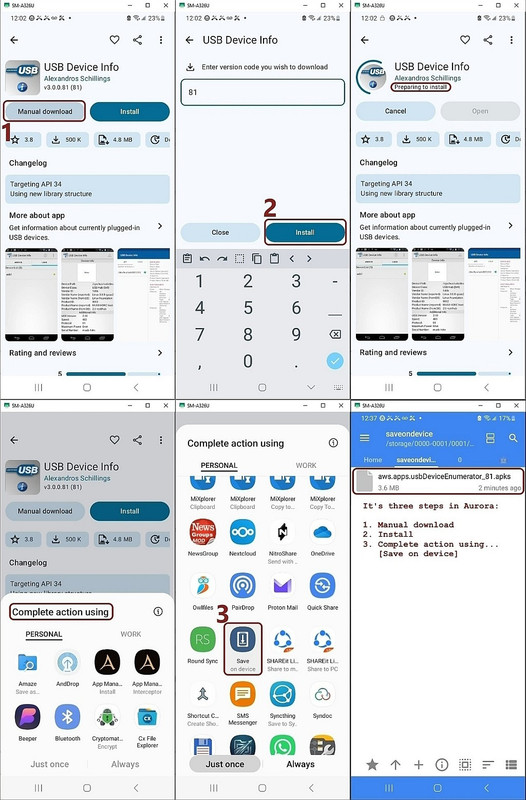
    Take a look at this screenshot I made while using the saveondevice app.
    <https://i.postimg.cc/SNZzqCQV/saveondevice.jpg>

    If you're in any given app, you can save its "stuff" anywhere you like.
    For example, let's say you're in a text editor which only saves its files
    to its own storage, which no other app has any access to nowadays.

    With this app, you can save that text file anywhere on your device.
    Once you've saved that text file, any editor can edit it.

    The point is that it's a trick to get data out of any given app.
    The problem is you have to save the data manually from every app.

    So I would only do it when I needed it (which, in my case, is when I use
    Aurora to download the APK off of the Google Play repository, I use this savetodevice app to save that APK so that I can access it outside of the
    Aurora app.

    Let's say I had a special database in a special app that I wanted another
    app to access. I'd use saveondevice to save it OUTSIDE the app so that any other app could access it.

    Save is concerned with saving files on an Android device. I
    have no need for chatter between apps or for the saving of files on
    phones. Is the idea to use Save to access files from the Android storage
    and save them somewhere else? That would be an ad-hoc backup strategy lacking the excellent and desirable synchronisation capabilities of GoodSync, so I don't think I would go for it.

    I think you understand it. It would only be useful for the most important things that you have, since it's a manual save-as operation as I see it.

    “It will use each app directly & then use Goodsync.” I don't follow this, is the idea that we would visit each app on the phone and copy its private files, then somehow pass them over to GoodSync?

    Once you've saved their data to non-privileged storage, then GoodSync can access that data. But as you already noticed, you have to do it for every
    app. That works for me because I only need to save APKs from Aurora.

    But it may be too much effort for what you want to do.

    To recap: I am trying to back up a phone but the OS won’t let the backup app have access to all the files that need to be copied to a safe
    location. I want some way to give GoodSync permission to work with the forbidden files, or some way to configure the OS so it removes its protection from the currently-inaccessible files. It now seems that I am
    out of luck.

    Yup. If you root, it would be different. Thank Google for this.


    Samsung Smart Switch for Windows seems to back up every file on an
    Android phone, albeit in a crass fashion, does anybody know how it does
    it? Could it use what Maria Sophia calls ‘a privileged system app’?

    I never used Samsung Smart Switch, but others might be able to help.
    --- Synchronet 3.22a-Linux NewsLink 1.2
  • From Carlos E.R.@[email protected] to comp.mobile.android on Thu Jun 4 08:20:46 2026
    From Newsgroup: comp.mobile.android

    On 2026-06-04 00:04, Alan Peeling wrote:
    To recap: I am trying to back up a phone but the OS won’t let the backup app have access to all the files that need to be copied to a safe
    location. I want some way to give GoodSync permission to work with the forbidden files, or some way to configure the OS so it removes its protection from the currently-inaccessible files. It now seems that I am
    out of luck.

    I am able to save most files to a computer, by using MTP protocol in
    Linux. Sometimes I had success by using an FTP server on the phone.
    --
    Cheers, Carlos.
    ESđŸ‡Ș🇾, EUđŸ‡ȘđŸ‡ș;
    --- Synchronet 3.22a-Linux NewsLink 1.2
  • From Alan Peeling@[email protected] to comp.mobile.android on Thu Jun 4 21:52:20 2026
    From Newsgroup: comp.mobile.android

    On 04/06/2026 07:20, Carlos E.R. wrote:
    I am able to save most files to a computer, by using MTP protocol in
    Linux. Sometimes I had success by using an FTP server on the phone.

    Are you able to save /Android/data/, /sdcard/Android, and most
    subdirectories of /sdcard/Android?
    --
    Alan in the UK
    --- Synchronet 3.22a-Linux NewsLink 1.2
  • From Alan Peeling@[email protected] to comp.mobile.android on Thu Jun 4 22:02:37 2026
    From Newsgroup: comp.mobile.android

    On 04/06/2026 00:37, Maria Sophia wrote:
    Alan Peeling wrote:
    I think you can be forgiven for that, thanks for your help, I think the
    end is in sight.
    I'm grateful for the reference to Android file management, the nub is
    Write access to all internal storage directoriesù  except
    /Android/data/, /sdcard/Android, and most subdirectories of
    /sdcard/Android. Distressingly, it doesn't document a workaround.

    What you're fighting is Google made it very hard, and maybe impossible, in the recent Android versions, for any app that isn't a system app, to access the data of another app.

    There are some tricks using Shizuku, but if you're unrooted, as I am,
    Google designed it to be almost impossible, if not impossible.

    One way I get around the limitation is the savetodevice trick, but I have only used it for saving APKs off of the Google Play Store repository so
    far.

    1. I download the APK off the Google Play Store repository using one app
    2. But while I'm in that app, I use savetodevice to put it somewhere else

    What savetodevice lets you do is save anything somewhere else.
    But the limitation is you have to be in the app that has the data.

    Once you save it to somewhere else though, then any app can access it.
    It's a trick I only recently found out about from the Aurora developers.

    I'm a bit bewildered. I went to
    <https://f-droid.org/packages/name.lmj001.savetodevice> and installed
    Save. It appears not to be a stand-alone app but an adjunct to something
    called Android Sharesheet, which supports apps' sending data to one
    another.

    Take a look at this screenshot I made while using the saveondevice app.
    <https://i.postimg.cc/SNZzqCQV/saveondevice.jpg>

    If you're in any given app, you can save its "stuff" anywhere you like.
    For example, let's say you're in a text editor which only saves its files
    to its own storage, which no other app has any access to nowadays.

    With this app, you can save that text file anywhere on your device.
    Once you've saved that text file, any editor can edit it.

    The point is that it's a trick to get data out of any given app.
    The problem is you have to save the data manually from every app.

    So I would only do it when I needed it (which, in my case, is when I use Aurora to download the APK off of the Google Play repository, I use this savetodevice app to save that APK so that I can access it outside of the Aurora app.

    Let's say I had a special database in a special app that I wanted another
    app to access. I'd use saveondevice to save it OUTSIDE the app so that any other app could access it.

    Save is concerned with saving files on an Android device. I
    have no need for chatter between apps or for the saving of files on
    phones. Is the idea to use Save to access files from the Android storage
    and save them somewhere else? That would be an ad-hoc backup strategy
    lacking the excellent and desirable synchronisation capabilities of
    GoodSync, so I don't think I would go for it.

    I think you understand it. It would only be useful for the most important things that you have, since it's a manual save-as operation as I see it.

    ñ€ƓIt will use each app directly & then use Goodsync.ñ€ I don't follow
    this, is the idea that we would visit each app on the phone and copy its
    private files, then somehow pass them over to GoodSync?

    Once you've saved their data to non-privileged storage, then GoodSync can access that data. But as you already noticed, you have to do it for every app. That works for me because I only need to save APKs from Aurora.

    But it may be too much effort for what you want to do.

    To recap: I am trying to back up a phone but the OS wonñ€ℱt let the backup
    app have access to all the files that need to be copied to a safe
    location. I want some way to give GoodSync permission to work with the
    forbidden files, or some way to configure the OS so it removes its
    protection from the currently-inaccessible files. It now seems that I am
    out of luck.

    Yup. If you root, it would be different. Thank Google for this.


    Samsung Smart Switch for Windows seems to back up every file on an
    Android phone, albeit in a crass fashion, does anybody know how it does
    it? Could it use what Maria Sophia calls ñ€˜a privileged system appñ€ℱ?

    I never used Samsung Smart Switch, but others might be able to help.

    This procedure looks very interesting, I’m glad you told me about it. I don't think visiting each app to export the files it controls is
    realistic for regular and routine backups, but I've put your post in my
    PIM so I can consult it if the need arises.

    I've written to the GoodSync people to suggest they approach Samsung
    about developing a back end to Smart Switch that does proper
    synchronisation. Then I would be backing up kilobytes instead of
    gigabytes and I could say farewell to two-hour cloud uploads. The
    GoodSync people haven’t answered me.

    It seems I’m completely defeated, but I have learned a lot this week.
    Thanks for sharing your wisdom.
    --
    Alan in the UK
    --- Synchronet 3.22a-Linux NewsLink 1.2
  • From Carlos E.R.@[email protected] to comp.mobile.android on Fri Jun 5 13:33:35 2026
    From Newsgroup: comp.mobile.android

    On 2026-06-04 22:52, Alan Peeling wrote:
    On 04/06/2026 07:20, Carlos E.R. wrote:
    I am able to save most files to a computer, by using MTP protocol in
    Linux. Sometimes I had success by using an FTP server on the phone.

    Are you able to save /Android/data/, /sdcard/Android, and most subdirectories of /sdcard/Android?


    With FTP I have /Android/data/. I don't have an /sdcard/ directory on
    this phone.

    With mtpfs I also have "/Android/data/", but I had to run the copy
    several times till no errors were reported.


    There is a thread here where we commented about it.

    Re: How do nonroot Android & nonjailbroken iOS run SMB servers to
    connect to each other & Windows?

    From: Herbert Kleebauer <...>

    Date: Thu, 24 Apr 2025 21:31:44 +0200


    But the copies I made are dated July.

    /2025-07-18-ftp │ 23331M /2025-07-18-mtpfs │ 56257M /2025-07-18-test │ 56170M

    So the latest directory was made with a method that accessed more files.
    I don't remember what method I used :-?

    I will have to run tests again. I have a note that says to use FTP, but
    must be a different than the one used in the first directory.


    My notes on the ftp method say:

    +++------------
    Use Cx File Explorer on phone to activate ftp. The app can be
    backgrounded, swipe from the bottom.

    Copy over the files using mc to temporary directory. No, use FileZilla

    Finally, use rsync to save space.
    ------------++-


    Sigh, incomplete notes.
    --
    Cheers, Carlos.
    ESđŸ‡Ș🇾, EUđŸ‡ȘđŸ‡ș;
    --- Synchronet 3.22a-Linux NewsLink 1.2
  • From Maria Sophia@[email protected] to comp.mobile.android on Fri Jun 5 07:10:17 2026
    From Newsgroup: comp.mobile.android

    Carlos E.R. wrote:
    Are you able to save /Android/data/, /sdcard/Android, and most
    subdirectories of /sdcard/Android?


    With FTP I have /Android/data/. I don't have an /sdcard/ directory on
    this phone.

    Hi Carlos,
    When someone says /sdcard, they usually mean the internal storage.
    That's because, for whatever reason, Android calls it that.

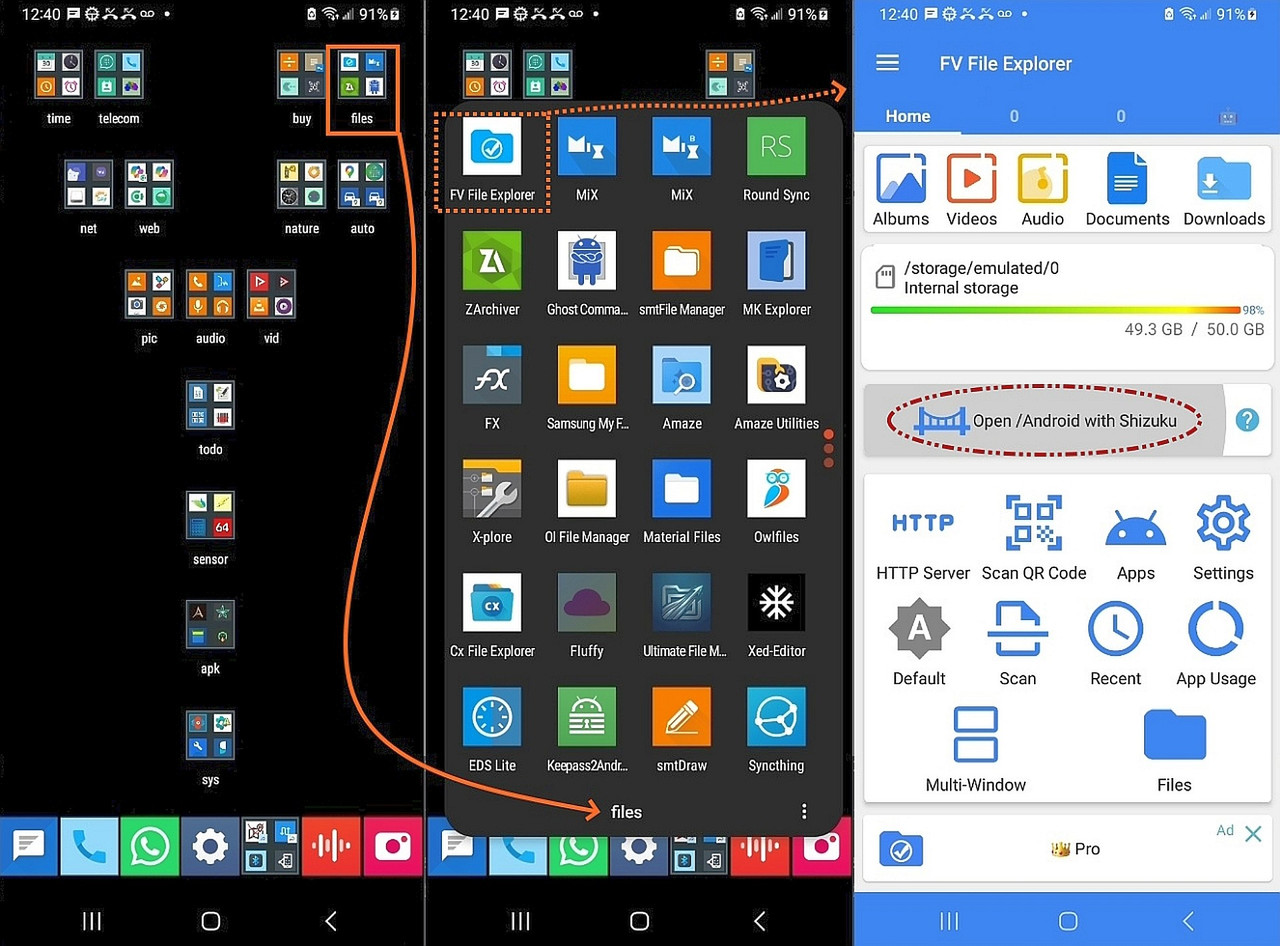
    When you look at your internal storage with a good file manager, you'll see internal storage shown as /sdcard while external storage will appear under /storage/ (e.g., /storage/XXXX-XXXX, where the letters are a formatting
    result) although, just to confuse us, internal storage is also under
    /storage but /storage/emulated/0 (just to make life miserable for us).
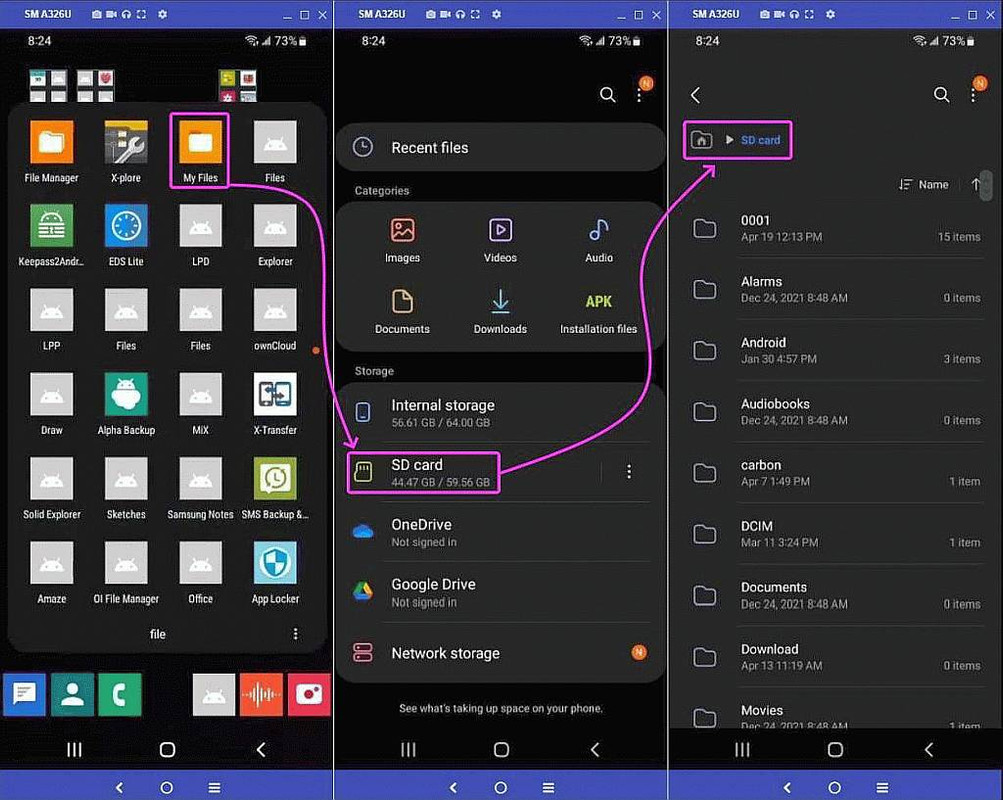
    <https://i.postimg.cc/KjrxmJY8/fv-file-explorer.jpg>

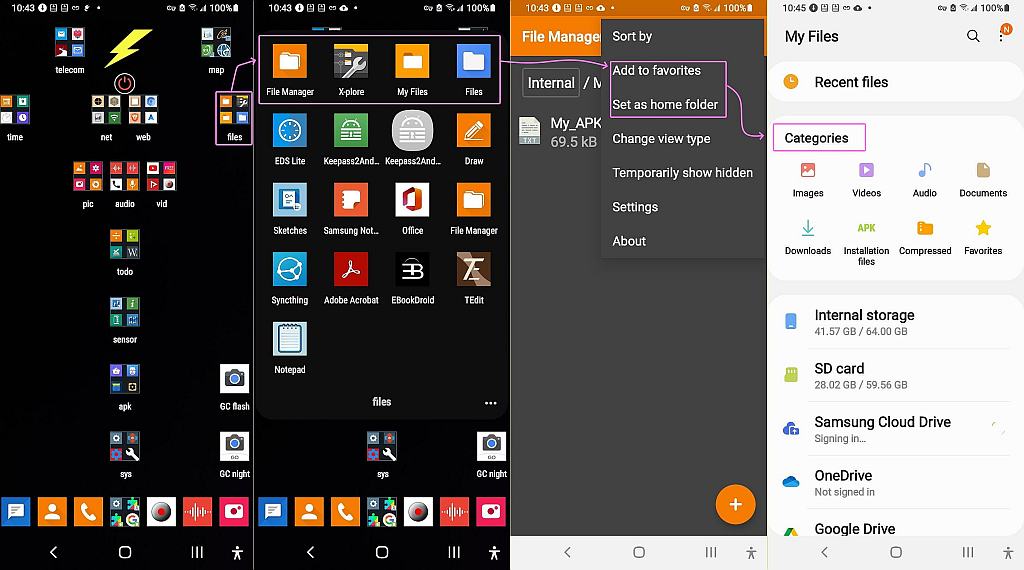
    When we use crappy file managers, it hides the real filespec from us.
    <https://i.postimg.cc/FKR56YX1/files01.jpg>

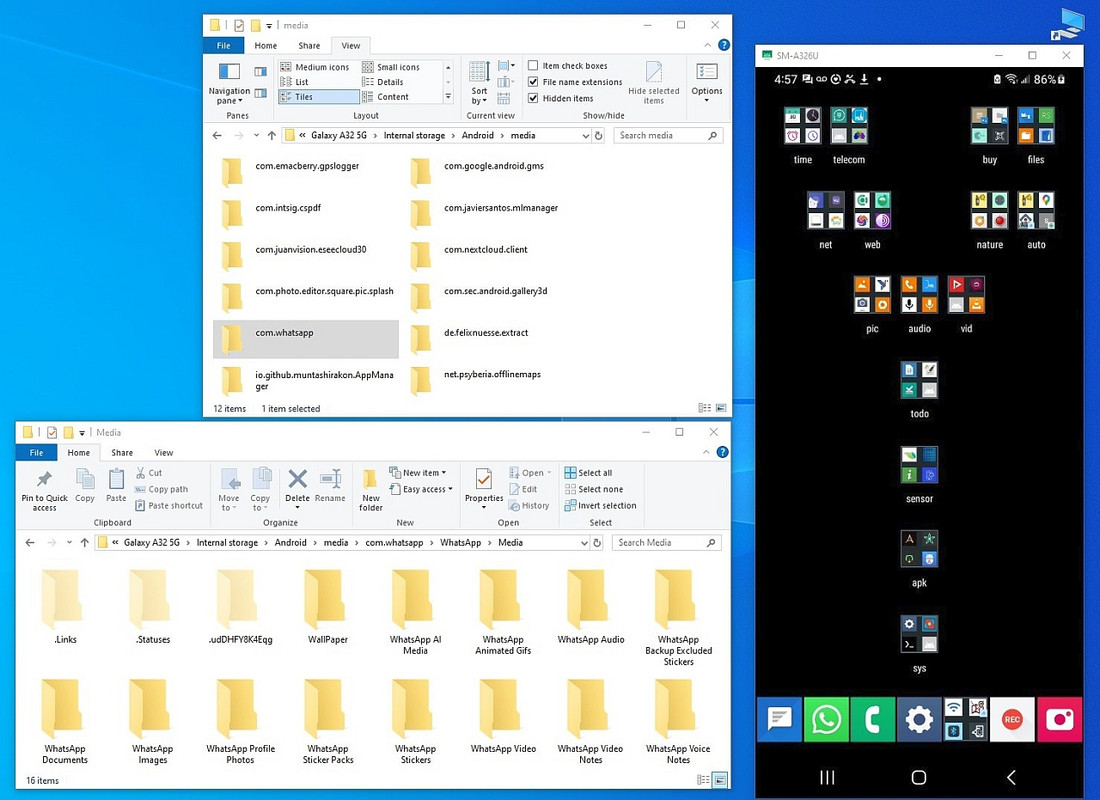
    When we connect over USB to the PC, the names get munged even more.
    <https://i.postimg.cc/13DwRbC7/media.jpg>

    So the latest directory was made with a method that accessed more files.
    I don't remember what method I used :-?

    I will have to run tests again. I have a note that says to use FTP, but
    must be a different than the one used in the first directory.

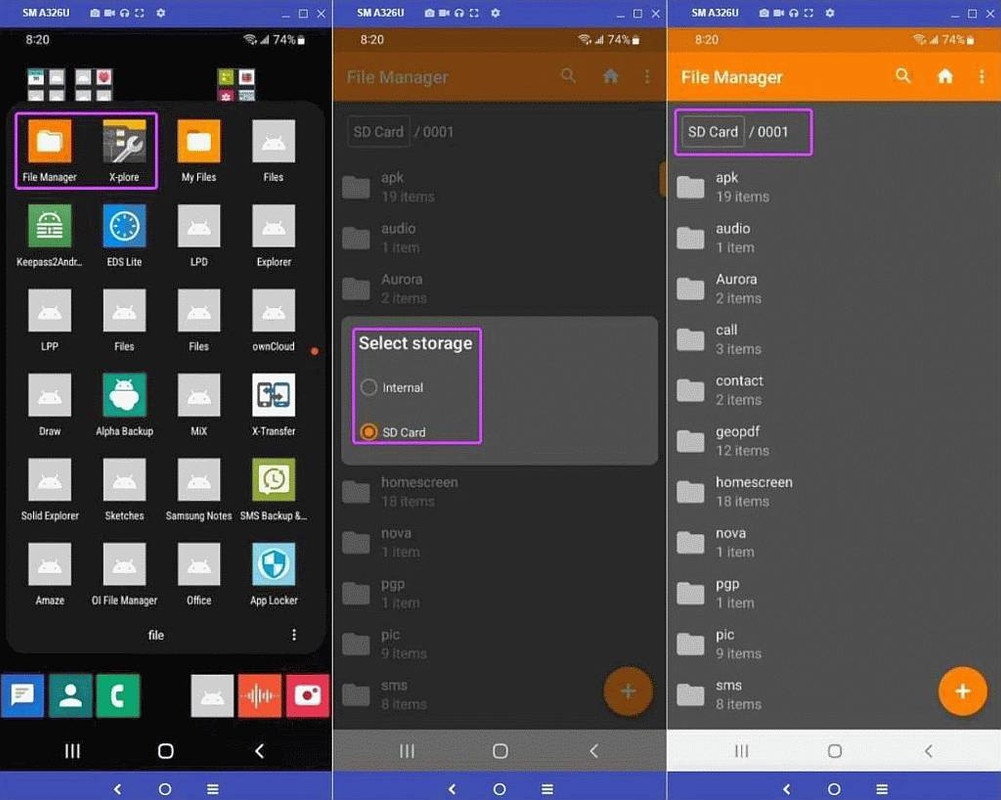
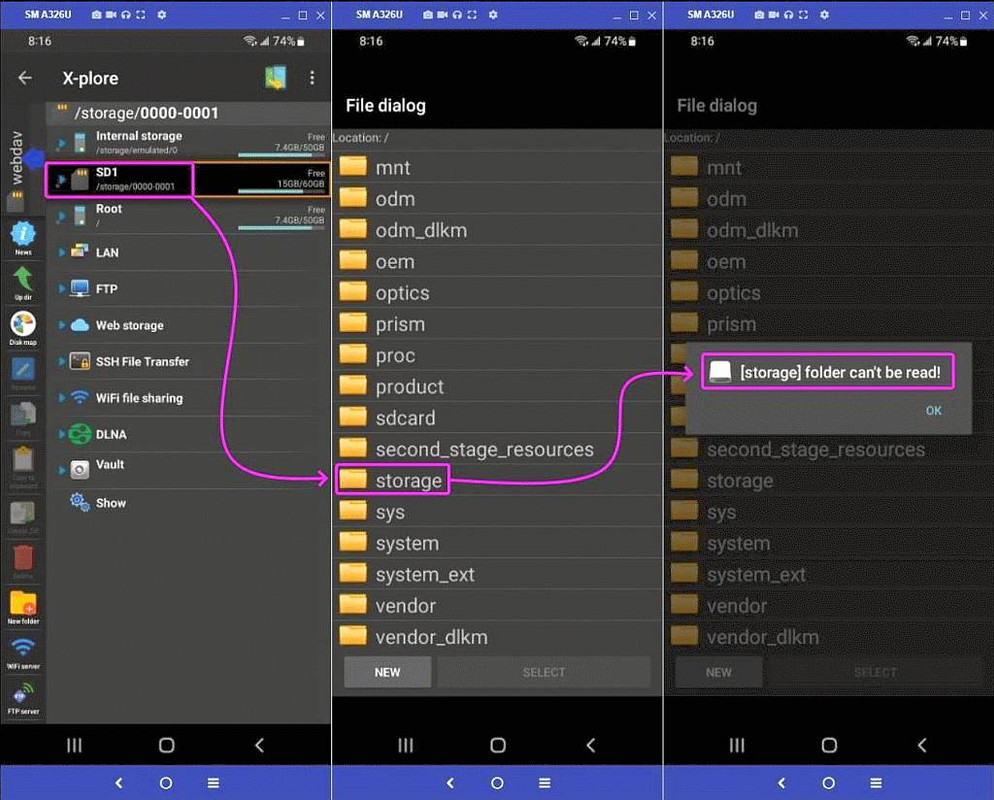
    I too have noticed that not only does each file manager "see" the Android filespec different in that some can see deeper than others, and even more
    so, some use Shizuku to access shell permissions that others don't access, depending on how I mount the Android filesys to Windows, I see more stuff.

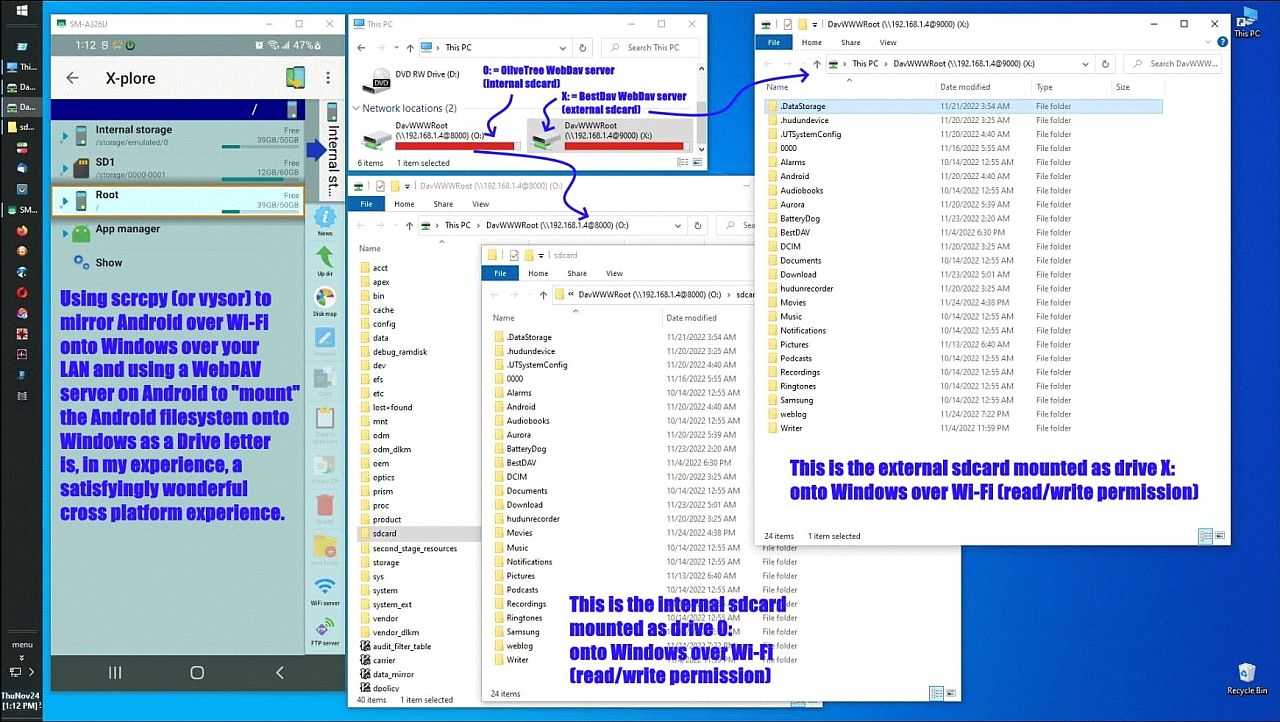
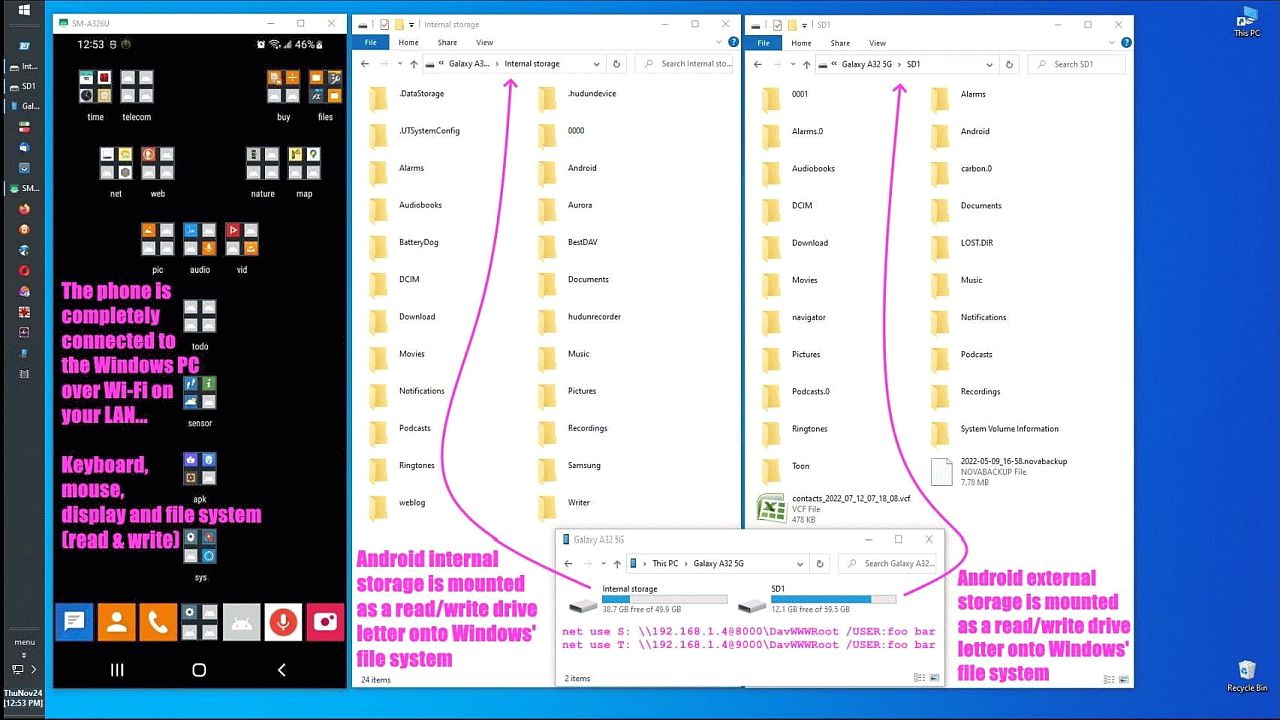
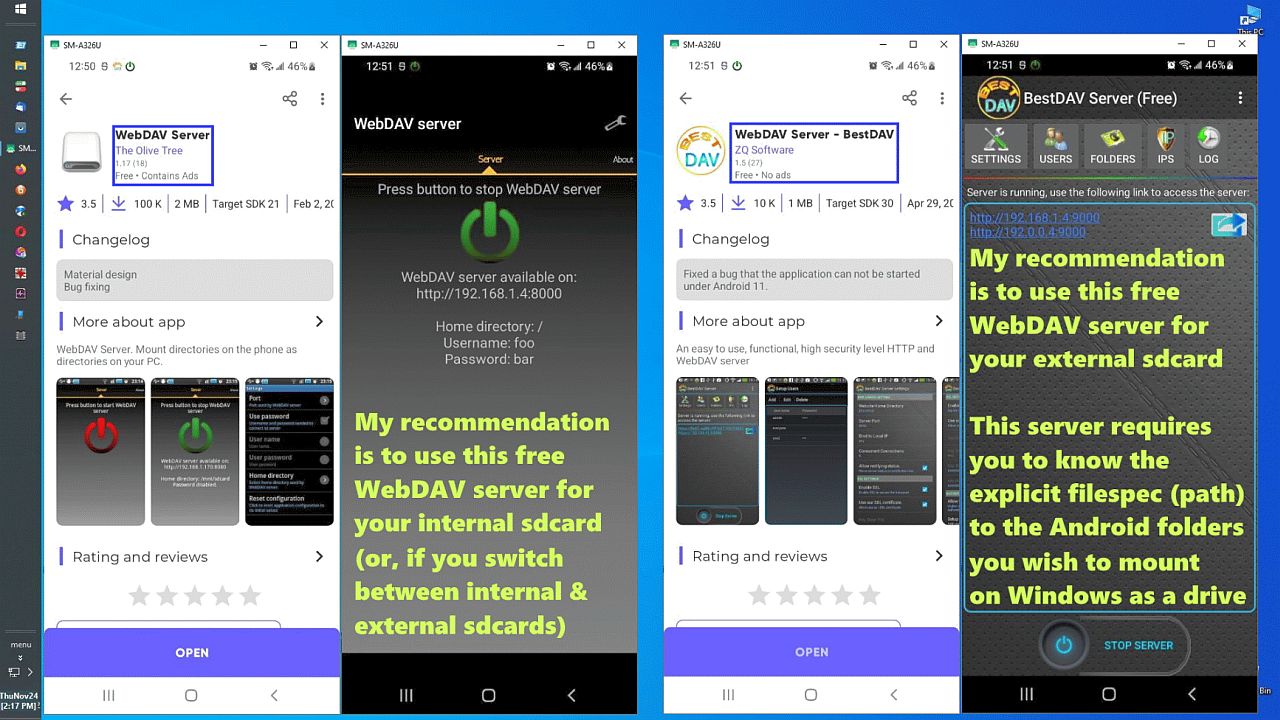
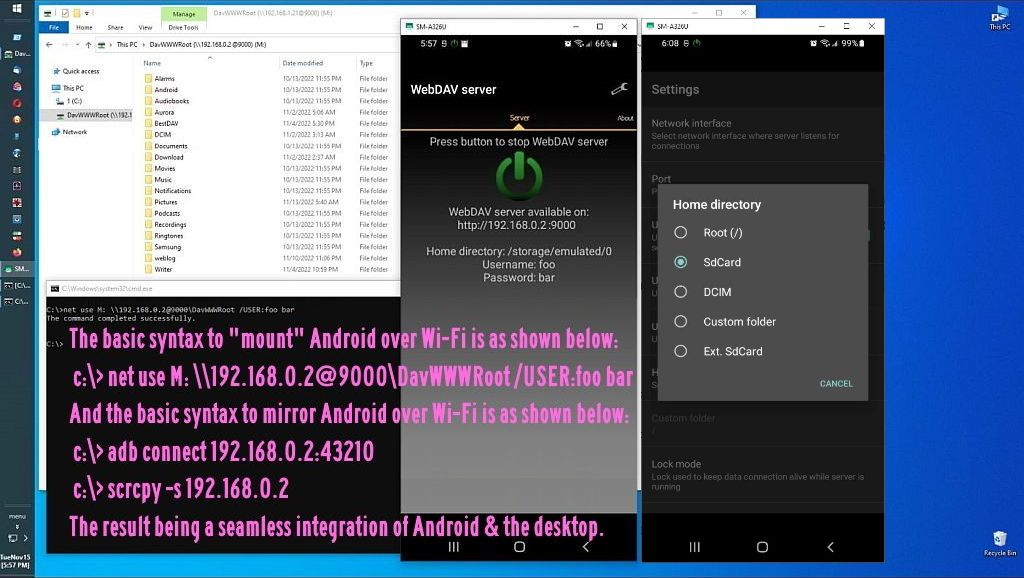
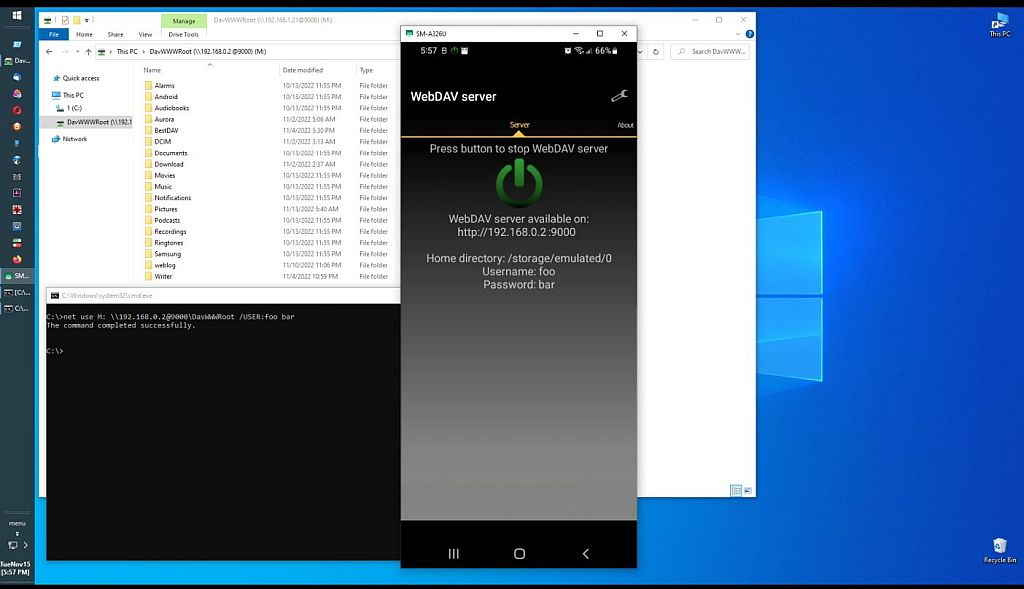
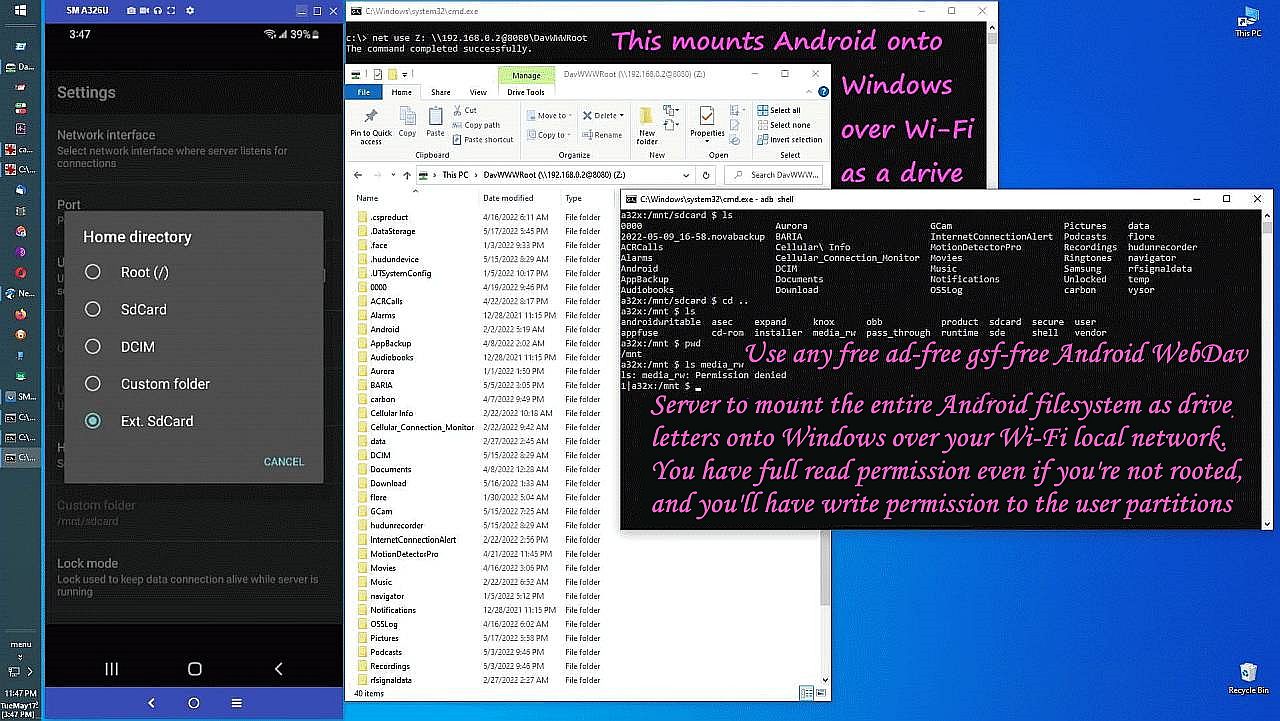
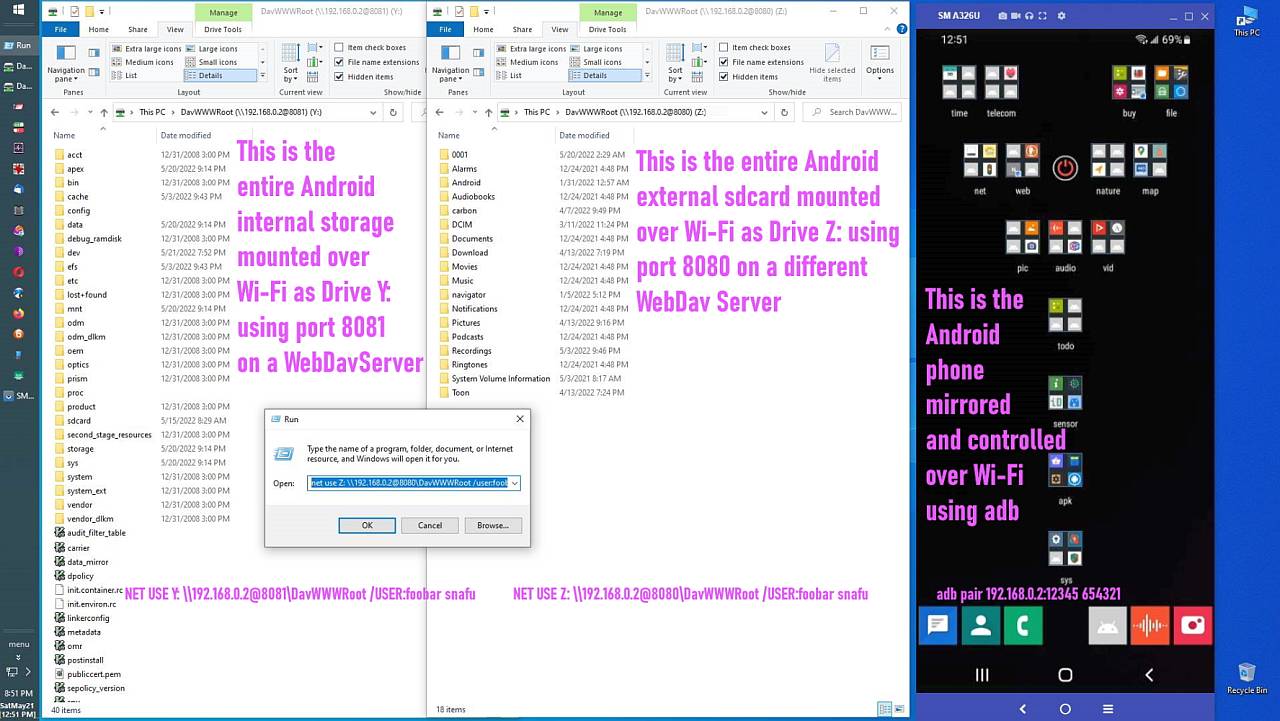
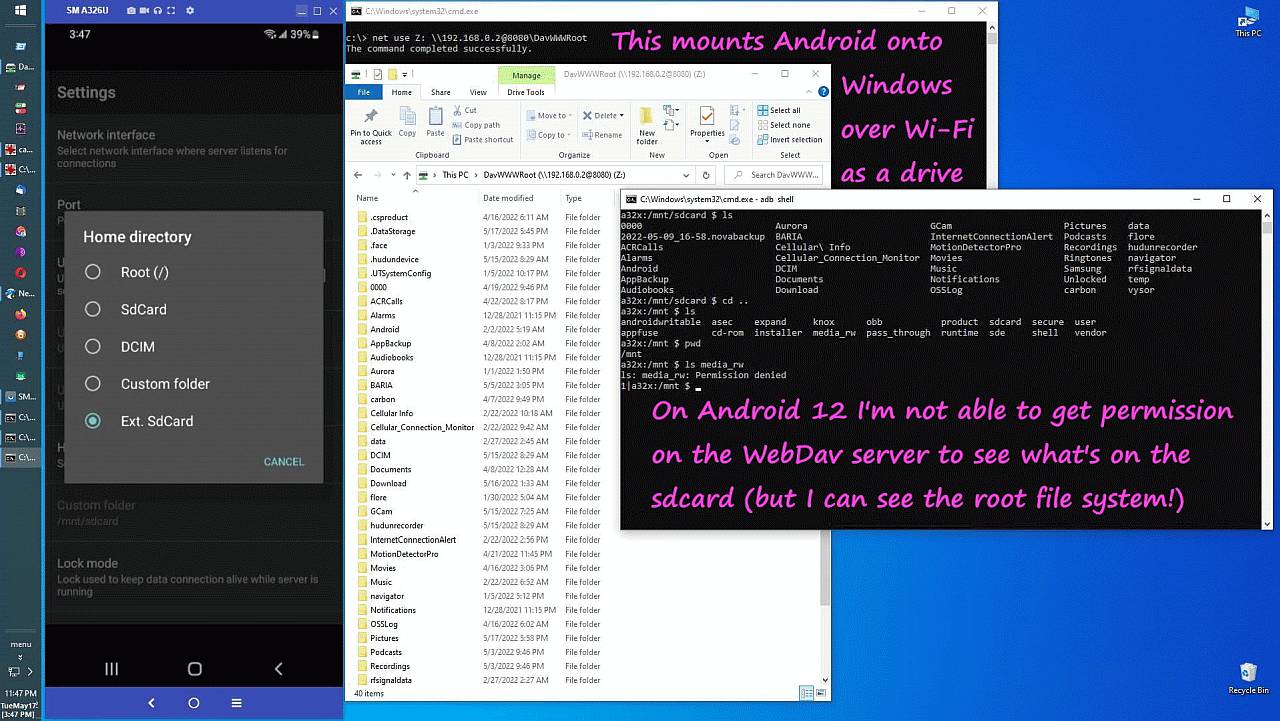
    net use Z: \\102.168.1.2@8000\DavWWWRoot /USER:joe * /PERSISTENT:YES
    <https://i.postimg.cc/gcKXV6F7/webdav16.jpg> A third free WebDAV server
    <https://i.postimg.cc/JhjpnRgh/webdav14.jpg> Mirroring Android on Windows
    <https://i.postimg.cc/QtbR1GY0/webdav13.jpg> Over Wi-Fi on your home LAN
    <https://i.postimg.cc/yYWwgGmy/webdav12.jpg> As Windows drive letters
    <https://i.postimg.cc/BQyRxCN9/webdav11.jpg> Mount sdcards read & write
    <https://i.postimg.cc/wM4Z45pN/webdav10.jpg> Free Android WebDAV servers
    <https://i.postimg.cc/D0qMxTMB/webdav09.jpg> FOSS general purpose solution
    <https://i.postimg.cc/qv6HJ7GN/webdav08.jpg> Each sdcard is a drive letter
    <https://i.postimg.cc/cJLK1wt0/webdav07.jpg> Mount the entire filesystem
    <https://i.postimg.cc/BvJdKWzt/webdav06.jpg> Both sdcards mounted
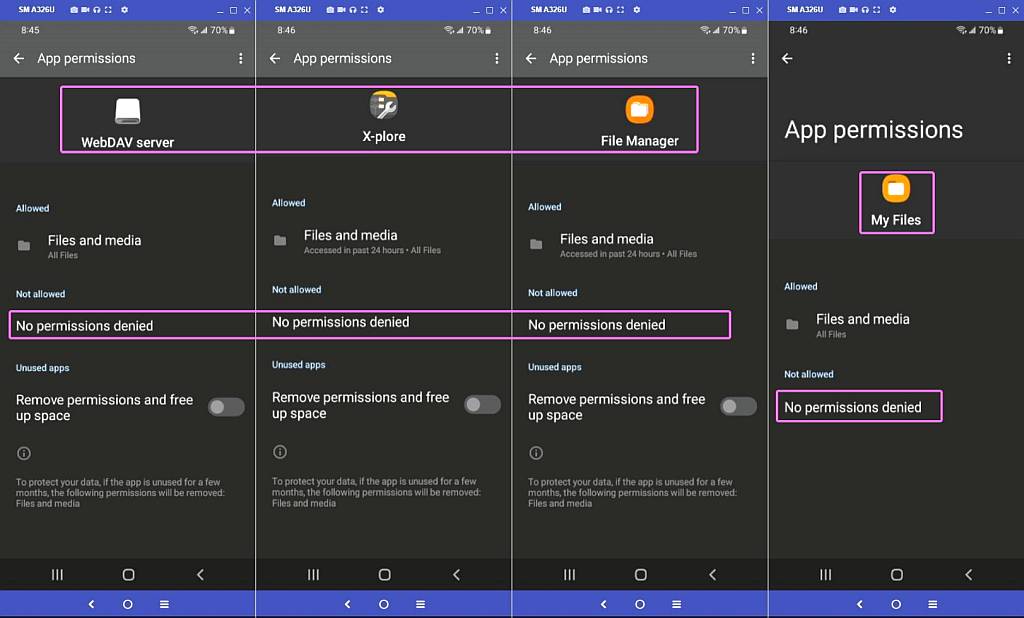
    <https://i.postimg.cc/Njm6ZXsc/webdav05.jpg> Permissions are the same
    <https://i.postimg.cc/3xCsd4HX/webdav04.jpg> My Files has permission
    <https://i.postimg.cc/BvmRBrbt/webdav03.jpg> File Manager has permission
    <https://i.postimg.cc/X7FS61HD/webdav02.jpg> X-plore has no permission
    <https://i.postimg.cc/sxzR0Pg8/webdav01.jpg> WebDav has no sd permission
    --
    Knowledge is best shared, like a fresh pizza & beer, among your friends.
    --- Synchronet 3.22a-Linux NewsLink 1.2
  • From Alan Peeling@[email protected] to comp.mobile.android on Fri Jun 5 16:07:10 2026
    From Newsgroup: comp.mobile.android

    On 05/06/2026 12:33, Carlos E.R. wrote:
    On 2026-06-04 22:52, Alan Peeling wrote:
    On 04/06/2026 07:20, Carlos E.R. wrote:
    I am able to save most files to a computer, by using MTP protocol in
    Linux. Sometimes I had success by using an FTP server on the phone.

    Are you able to save /Android/data/, /sdcard/Android, and most
    subdirectories of /sdcard/Android?


    With FTP I have /Android/data/. I don't have an /sdcard/ directory on
    this phone.

    With mtpfs I also have "/Android/data/", but I had to run the copy
    several times till no errors were reported.


    There is a thread here where we commented about it.

    Re: How do nonroot Android & nonjailbroken iOS run SMB servers to
    connect to each other & Windows?

    From: Herbert Kleebauer <...>

    Date: Thu, 24 Apr 2025 21:31:44 +0200


    But the copies I made are dated July.

    /2025-07-18-ftp                                             │ 23331M
    /2025-07-18-mtpfs                                           │ 56257M
    /2025-07-18-test                                            │ 56170M

    So the latest directory was made with a method that accessed more files.
    I don't remember what method I used :-?

    I will have to run tests again. I have a note that says to use FTP, but
    must be a different than the one used in the first directory.


    My notes on the ftp method say:

    +++------------
    Use Cx File Explorer on phone to activate ftp. The app can be
    backgrounded, swipe from the bottom.

    Copy over the files using mc to temporary directory. No, use FileZilla

    Finally, use rsync to save space.
    ------------++-


    Sigh, incomplete notes.


    That’s Interesting. My stash of this newsgroup's posts doesn't go back
    as far as 2025. With the aid of ChatGPT I did tinker about with
    FileZilla and adb but we were defeated by Android’s file protection
    regime. I give up.
    --
    Alan in the UK
    --- Synchronet 3.22a-Linux NewsLink 1.2
  • From Maria Sophia@[email protected] to comp.mobile.android on Fri Jun 5 10:41:10 2026
    From Newsgroup: comp.mobile.android

    Alan Peeling wrote:
    Thatïżœs Interesting. My stash of this newsgroup's posts doesn't go back
    as far as 2025. With the aid of ChatGPT I did tinker about with
    FileZilla and adb but we were defeated by Androidïżœs file protection
    regime. I give up.

    https://groups.google.com/g/comp.mobile.android https://newsgrouper.org/comp.mobile.android
    --- Synchronet 3.22a-Linux NewsLink 1.2
  • From Dave Royal@[email protected] to comp.mobile.android on Fri Jun 5 16:42:36 2026
    From Newsgroup: comp.mobile.android

    On Fri, 5 Jun 2026 13:33:35 +0200, Carlos E.R. wrote:

    On 2026-06-04 22:52, Alan Peeling wrote:
    On 04/06/2026 07:20, Carlos E.R. wrote:
    I am able to save most files to a computer, by using MTP protocol in
    Linux. Sometimes I had success by using an FTP server on the phone.

    Are you able to save /Android/data/, /sdcard/Android, and most
    subdirectories of /sdcard/Android?


    With FTP I have /Android/data/. I don't have an /sdcard/ directory on
    this phone.

    /sdcard is a leftover from the early days of Android. For years it's been
    a symlink to /storage/emulated/0, there for backward compatibility- and because it was shorter to type.

    On this Samsung tablet (Android 13) it's symlinked like this:
    /sdcard -> /storage/self/primary
    /storage/self/primary -> /storage/emulated/0
    (I don't recall seeing '/storage/self' before.)

    My Android file manager calls that 'Internal storage' and MTP calls it
    that too.

    With mtpfs I also have "/Android/data/", but I had to run the copy
    several times till no errors were reported.

    Did it copy much?

    I had a look using Linux (Debian, Thunar, MTP) and ADB shell at 'Internal storage/Android/data'. There are directories for lots of apps, most of
    them I think. But not all: some old apps (eg PiaoHong Newsreader, zxing barcode scanner) are not present. Many contain visible directories with standard names - eg 'files', 'cache' - and subdirectories of those - but
    they are mostly empty. However a few do have data there; for example
    osmand~ has maps and settings and my newspaper reader - based on
    pressreader - holds lots of stuff. I assume it's either developer choice,
    or it depends on the age of the app, whether Android/data is used.

    So where does, for example, my email client K9 (com.fsck.k9) hold its
    data, in case I wanted to copy it? In the days when I used to jailbreak my devices ISTR it was in /data/data and my guess is that it still is. But I don't have permission to read that in ADB shell.

    I tried an adb pull:
    adb pull /data/data/com.fsck.k9/*
    adb: error: failed to stat remote object '/data/data/com.fsck.k9/*': Permission denied

    So that directory exists. But might be empty and the data moved elsewhere!


    [snip to end]
    --
    (Remove any numerics from my email address.)
    --- Synchronet 3.22a-Linux NewsLink 1.2
  • From Maria Sophia@[email protected] to comp.mobile.android on Fri Jun 5 10:54:08 2026
    From Newsgroup: comp.mobile.android

    Dave Royal wrote:
    So where does, for example, my email client K9 (com.fsck.k9) hold its
    data, in case I wanted to copy it?

    I was recently told by the Aurora developers in India about saveondevice
    <https://i.postimg.cc/SNZzqCQV/saveondevice.jpg>

    I see zero downside to implementing it, as all it does is allow any app to
    save its private data outside the app's sandboxed storage, if you want to.
    <https://f-droid.org/packages/name.lmj001.savetodevice>

    To me, it's a no brainer. You don't have to use it.
    But when you need it, it's there.

    I used it to save from Aurora's /data/data to the real external sd card.
    --- Synchronet 3.22a-Linux NewsLink 1.2
  • From Alan Peeling@[email protected] to comp.mobile.android on Fri Jun 5 23:06:17 2026
    From Newsgroup: comp.mobile.android

    On 05/06/2026 17:41, Maria Sophia wrote:
    Alan Peeling wrote:
    ThatÂąs Interesting. My stash of this newsgroup's posts doesn't go back
    as far as 2025. With the aid of ChatGPT I did tinker about with
    FileZilla and adb but we were defeated by AndroidÂąs file protection
    regime. I give up.

    https://groups.google.com/g/comp.mobile.android https://newsgrouper.org/comp.mobile.android

    https://groups.google.com/g/comp.mobile.android

    Did you have a particular thread in mind?

    https://newsgrouper.org/comp.mobile.android

    "You appear to be connecting from an IP address in the United Kingdom. Unfortunately this site is no longer available to UK users."

    Fortunately VPN fooled it. I was intrigued that you were able to snaffle
    files from under WhatsApp's nose. I'll keep reading in this site, thanks.
    --
    Alan in the UK
    --- Synchronet 3.22a-Linux NewsLink 1.2
  • From Alan Peeling@[email protected] to comp.mobile.android on Fri Jun 5 23:22:53 2026
    From Newsgroup: comp.mobile.android

    On 05/06/2026 17:41, Maria Sophia wrote:
    Alan Peeling wrote:
    ThatÂąs Interesting. My stash of this newsgroup's posts doesn't go back
    as far as 2025. With the aid of ChatGPT I did tinker about with
    FileZilla and adb but we were defeated by AndroidÂąs file protection
    regime. I give up.

    https://groups.google.com/g/comp.mobile.android https://newsgrouper.org/comp.mobile.android

    https://newsgrouper.org/comp.mobile.android

    Weyhey, made the search thing work!
    --
    Alan in the UK
    --- Synchronet 3.22a-Linux NewsLink 1.2
  • From Maria Sophia@[email protected] to comp.mobile.android on Fri Jun 5 19:12:21 2026
  • From Andy Burns@[email protected] to comp.mobile.android on Sat Jun 6 08:40:01 2026
    From Newsgroup: comp.mobile.android

    Maria Sophia wrote:

    If you have the message id, then there's another way.
    <https://newsgrouper.org/> (test this out)
    <https://tinyurl.com/message-id>
    <http://al.howardknight.net/>

    usually on its knees (hammered by AI scraping?)

    <http://news.chmurka.net/mid.php>
    <http://usenet.ovh/index.php?article=ual>
    <https://www.novabbs.com/SEARCH/search_nocem.php>
    There's a new one <https://usenet.id>

    I wish there was one that would search recent body text ...
    --- Synchronet 3.22a-Linux NewsLink 1.2
  • From Alan Peeling@[email protected] to comp.mobile.android on Sun Jun 7 12:46:19 2026
    From Newsgroup: comp.mobile.android

    On 05/06/2026 12:33, Carlos E.R. wrote:
    On 2026-06-04 22:52, Alan Peeling wrote:
    On 04/06/2026 07:20, Carlos E.R. wrote:
    I am able to save most files to a computer, by using MTP protocol in
    Linux. Sometimes I had success by using an FTP server on the phone.

    Are you able to save /Android/data/, /sdcard/Android, and most
    subdirectories of /sdcard/Android?


    With FTP I have /Android/data/. I don't have an /sdcard/ directory on
    this phone.

    With mtpfs I also have "/Android/data/", but I had to run the copy
    several times till no errors were reported.


    There is a thread here where we commented about it.

    Re: How do nonroot Android & nonjailbroken iOS run SMB servers to
    connect to each other & Windows?

    From: Herbert Kleebauer <...>

    Date: Thu, 24 Apr 2025 21:31:44 +0200


    But the copies I made are dated July.

    /2025-07-18-ftp                                             │ 23331M
    /2025-07-18-mtpfs                                           │ 56257M
    /2025-07-18-test                                            │ 56170M

    So the latest directory was made with a method that accessed more files.
    I don't remember what method I used :-?

    I will have to run tests again. I have a note that says to use FTP, but
    must be a different than the one used in the first directory.


    My notes on the ftp method say:

    +++------------
    Use Cx File Explorer on phone to activate ftp. The app can be
    backgrounded, swipe from the bottom.

    Copy over the files using mc to temporary directory. No, use FileZilla

    Finally, use rsync to save space.
    ------------++-


    Sigh, incomplete notes.


    I found the thread ‘How do nonroot Android & nonjailbroken iOS run SMB servers to connect to each other & Windows?’ on https://newsgrouper.org/comp.mobile.android , thanks for the pointers.
    It is a killer thread, it took me hours to read, and it's stuffed with
    the sort of flames that make one embarrassed to be human. It did contain
    some gems, for example I didn't know that Windows File Explorer could be
    used as an FTP client. The app Carlos remembered seems to be WebDAV FS,
    which lets the phone appear as a drive in File Explorer. That seemed
    like useful functionality so I installed it. I know File Explorer
    already has something similar but I've found it to be flaky and
    confusing; I can never tell whether I'm working in the phone or in a
    copy of it on my C: drive. I wasn't optimistic that WebDAV FS would
    solve the problem of inaccessible Android folders. I was right not to be optimistic, when I backed up through it I recovered fewer files than
    GoodSync Server fetched, so in that respect it's a turkey. There was a tantalising post suggesting that the Android FTP server primitive ftpd,
    not in a sanitised version available though Play Store, but in a more resourceful form that comes from F-Droid, could access off-limits
    Android folders. I tried it and it doesn’t work.

    Perhaps the way to back up my phone is to use Samsung Smart Switch after
    major structural changes to its software and GoodSync Server for
    day-to-day maintenance.

    Whilst I was exploring I came across the news that, in a few weeks,
    Google plans to block Android apps that it has not approved in a
    bureaucratic and money consuming process. Everyone else may already know
    about this but I didn’t. There is a site at https://keepandroidopen.org/
    giving details and showing links that can be used for asking
    regulatory bodies to oppose this nastiness.
    --
    Alan in the UK
    --- Synchronet 3.22a-Linux NewsLink 1.2
  • From Carlos E.R.@[email protected] to comp.mobile.android on Sun Jun 7 14:32:18 2026
    From Newsgroup: comp.mobile.android

    On 2026-06-07 13:46, Alan Peeling wrote:
    On 05/06/2026 12:33, Carlos E.R. wrote:
    On 2026-06-04 22:52, Alan Peeling wrote:
    On 04/06/2026 07:20, Carlos E.R. wrote:
    I am able to save most files to a computer, by using MTP protocol in
    Linux. Sometimes I had success by using an FTP server on the phone.

    Are you able to save /Android/data/, /sdcard/Android, and most
    subdirectories of /sdcard/Android?


    With FTP I have /Android/data/. I don't have an /sdcard/ directory on
    this phone.

    With mtpfs I also have "/Android/data/", but I had to run the copy
    several times till no errors were reported.


    There is a thread here where we commented about it.

    Re: How do nonroot Android & nonjailbroken iOS run SMB servers to
    connect to each other & Windows?

    From: Herbert Kleebauer <...>

    Date: Thu, 24 Apr 2025 21:31:44 +0200


    But the copies I made are dated July.

    /2025-07-18-ftp                                             │ 23331M
    /2025-07-18-mtpfs                                           │ 56257M
    /2025-07-18-test                                            │ 56170M

    So the latest directory was made with a method that accessed more
    files. I don't remember what method I used :-?

    I will have to run tests again. I have a note that says to use FTP,
    but must be a different than the one used in the first directory.


    My notes on the ftp method say:

    +++------------
    Use Cx File Explorer on phone to activate ftp. The app can be
    backgrounded, swipe from the bottom.

    Copy over the files using mc to temporary directory. No, use FileZilla

    Finally, use rsync to save space.
    ------------++-


    Sigh, incomplete notes.


    I found the thread ‘How do nonroot Android & nonjailbroken iOS run SMB servers to connect to each other & Windows?’ on https://newsgrouper.org/ comp.mobile.android , thanks for the pointers. It is a killer thread, it took me hours to read, and it's stuffed with the sort of flames that
    make one embarrassed to be human.

    I tried to point you to the exact post where we discussed backups :-)

    It did contain some gems, for example
    I didn't know that Windows File Explorer could be used as an FTP client.
    The app Carlos remembered seems to be WebDAV FS, which lets the phone
    appear as a drive in File Explorer. That seemed like useful
    functionality so I installed it. I know File Explorer already has
    something similar but I've found it to be flaky and confusing; I can
    never tell whether I'm working in the phone or in a copy of it on my C: drive. I wasn't optimistic that WebDAV FS would solve the problem of inaccessible Android folders. I was right not to be optimistic, when I backed up through it I recovered fewer files than GoodSync Server
    fetched, so in that respect it's a turkey. There was a tantalising post suggesting that the Android FTP server primitive ftpd, not in a
    sanitised version available though Play Store, but in a more resourceful form that comes from F-Droid, could access off-limits Android folders. I tried it and it doesn’t work.

    Perhaps the way to back up my phone is to use Samsung Smart Switch after major structural changes to its software and GoodSync Server for day-to-
    day maintenance.

    Whilst I was exploring I came across the news that, in a few weeks,
    Google plans to block Android apps that it has not approved in a bureaucratic and money consuming process. Everyone else may already know about this but I didn’t. There is a site at https://keepandroidopen.org/
     giving details and showing links that can be used for asking
    regulatory bodies to oppose this nastiness.


    One of these days I'm going to do a backup of my phone, and I'll post in
    this thread what I find.

    I think it is the FTP server in Cx File Explorer in Android and
    Filezilla on the computer (Linux in my case)

    (https://play.google.com/store/apps/details?id=com.cxinventor.file.explorer)


    The thing is, only two things are of interest to me in the backup: photos/videos, and WhatsApp. The rest, I can just reinstall. Ok, SMSs too.
    --
    Cheers, Carlos.
    ESđŸ‡Ș🇾, EUđŸ‡ȘđŸ‡ș;
    --- Synchronet 3.22a-Linux NewsLink 1.2
  • From Maria Sophia@[email protected] to comp.mobile.android on Sun Jun 7 09:27:43 2026
    From Newsgroup: comp.mobile.android

    Alan Peeling wrote:
    I found the thread ïżœHow do nonroot Android & nonjailbroken iOS run SMB servers to connect to each other & Windows?ïżœ on https://newsgrouper.org/comp.mobile.android , thanks for the pointers.

    To tie Andy's suggestion of
    There's a new one <https://usenet.id>

    Luckily whomever authored that thread was intelligent enough to add
    keywords galore, which, I know, Andy once said made the subject long. :)

    Let's pop this message-id into Andy's suggested link...
    Newsgroups: misc.phone.mobile.iphone,comp.mobile.android,alt.comp.os.windows-10
    Subject: How do nonroot Android & nonjailbroken iOS run SMB servers to connect to each other & Windows?
    Date: Wed, 16 Apr 2025 06:12:44 -0000 (UTC)
    Message-ID: <vtnhos$1jn3$[email protected]>

    It worked.
    <https://usenet.id/[email protected]>

    The problem with the message-id approach, at least that one, is that it
    doesn't give the rest of the thread. It only gives us the opening post.

    Let's compare with <http://al.howardknight.net/>
    Drat. "HTTP Error 503.0 - Service Temporarily Unavailable"

    Let's compare then with <https://newsgrouper.org/>
    [continue as guest]
    [continue]

    Drat. It doesn't show the whole thread either.
    <https://newsgrouper.org/%[email protected]%3Ev>
    <https://newsgrouper.org/%[email protected]%3Emv>

    I'll add a more complete test to this new thread on the search subject.
    Newsgroups: comp.mobile.android,news.admin.peering
    Subject: PSA: How to find an article in web-searchable no-registration Usenet archives
    Date: Sun, 7 Jun 2026 09:26:09 -0600
    Message-ID: <11042ih$9tu$[email protected]>
    --
    We are all volunteers so let's all be kind, courteous and respectful!
    --- Synchronet 3.22a-Linux NewsLink 1.2
  • From Maria Sophia@[email protected] to comp.mobile.android on Sun Jun 7 09:46:06 2026
    From Newsgroup: comp.mobile.android

    Carlos E.R. wrote:
    The thing is, only two things are of interest to me in the backup: photos/videos, and WhatsApp. The rest, I can just reinstall. Ok, SMSs too.

    Carlos brings up a good point that backup, for Android, only needs a few things, most of which, I think, most people, I think, get from Google.

    We covered Whatsapp backup about a year or so ago, but as I recall, it can
    be done but it's easier to do it the official way as encryption is a bitch.

    SMS/MMS messages might be easy to back up or not, I'm not sure how to do
    it. I know my Pulsesms has a backup mechanism, but it requires an account.
    <https://home.pulsesms.app/overview/>

    Photos/Videos are relatively easy to backup, of course.

    For me, the homescreen is trivial to back up, but I use the Nova launcher.
    <https://tinyurl.com/nova-launcher>
    There may be an easy way to set up your homescreen and then flip
    temporarily to Nova Launcher, and then back it up & then flip back.

    Otherwise, I'm not sure how people back up their home screen nowadays.
    Does anyone know if any other launcher will back up their home screen?

    Then there are the apps, and the app data.

    IMHO, I back up the app even before I install it, so that's really the best way, in my opinion, which is to download the APK, and install from that.

    It takes knowledge though, which most people don't have, but I think the
    Google method that most people use does restore the APK from the Play
    Store. But I think people only get what's available on the Play Store.

    Does anyone know if the Google Play app backup method will get the exact
    same version that you had on your phone, or only the latest version?

    And what does it do if the app is no longer on the Google Play store?

    Backing up app data, nowadays, with the latest Android versions, is likely almost impossible without being root, so it's not something I'll even try, although the best way to do that is to put all app data on the external sd
    card and name the external sd card something you can remember.

    That way, when you pop the old external sd card into a new phone, the new
    phone won't know the difference as apps think the data was always there.

    Oh, and contacts. Most people use the default sqlite database, so I'm sure Google backs that up, and even if people don't use Google, it can be
    exported to a vcf file and imported into any other contacts app.

    What else do people generally need to back up for a new phone?
    --
    Knowledge is one thing... experience is something else.
    --- Synchronet 3.22a-Linux NewsLink 1.2
  • From Carlos E.R.@[email protected] to comp.mobile.android on Sun Jun 7 20:09:05 2026
    From Newsgroup: comp.mobile.android

    On 2026-06-07 17:46, Maria Sophia wrote:
    Carlos E.R. wrote:
    The thing is, only two things are of interest to me in the backup:
    photos/videos, and WhatsApp. The rest, I can just reinstall. Ok, SMSs too.

    Carlos brings up a good point that backup, for Android, only needs a few things, most of which, I think, most people, I think, get from Google.

    We covered Whatsapp backup about a year or so ago, but as I recall, it can
    be done but it's easier to do it the official way as encryption is a bitch.

    In my experience, they complement. The backup from computer can restore
    the media files, and then the one on the cloud restore the messages.


    SMS/MMS messages might be easy to back up or not, I'm not sure how to do
    it. I know my Pulsesms has a backup mechanism, but it requires an account.
    <https://home.pulsesms.app/overview/>

    I have somewhere an app that converts SMS to pain text. So, not RCS.


    Photos/Videos are relatively easy to backup, of course.

    For me, the homescreen is trivial to back up, but I use the Nova launcher.
    <https://tinyurl.com/nova-launcher>
    There may be an easy way to set up your homescreen and then flip
    temporarily to Nova Launcher, and then back it up & then flip back.

    Otherwise, I'm not sure how people back up their home screen nowadays.
    Does anyone know if any other launcher will back up their home screen?

    The default one, no. I either take photos, or make a list in paper.


    Then there are the apps, and the app data.

    IMHO, I back up the app even before I install it, so that's really the best way, in my opinion, which is to download the APK, and install from that.

    It takes knowledge though, which most people don't have, but I think the Google method that most people use does restore the APK from the Play
    Store. But I think people only get what's available on the Play Store.

    If the old phone is working, you can connect phone to phone with cable,
    and the new one pulls everything. I have never done this, had one
    trouble or another.


    Does anyone know if the Google Play app backup method will get the exact
    same version that you had on your phone, or only the latest version?

    Via cloud, the latest.


    And what does it do if the app is no longer on the Google Play store?

    I got apps that are designed for Asus into my Lenovo tablet, then on
    first run they say they are not compatible. So the last time I did not
    restore the tablet backup, but installed manually the apps I wanted.


    Backing up app data, nowadays, with the latest Android versions, is likely almost impossible without being root, so it's not something I'll even try, although the best way to do that is to put all app data on the external sd card and name the external sd card something you can remember.

    That way, when you pop the old external sd card into a new phone, the new phone won't know the difference as apps think the data was always there.

    Oh, and contacts. Most people use the default sqlite database, so I'm sure Google backs that up, and even if people don't use Google, it can be
    exported to a vcf file and imported into any other contacts app.

    What else do people generally need to back up for a new phone?
    --
    Cheers, Carlos.
    ESđŸ‡Ș🇾, EUđŸ‡ȘđŸ‡ș;
    --- Synchronet 3.22a-Linux NewsLink 1.2
  • From Alan Peeling@[email protected] to comp.mobile.android on Sun Jun 7 19:57:57 2026
    From Newsgroup: comp.mobile.android

    On 07/06/2026 13:32, Carlos E.R. wrote:
    On 2026-06-07 13:46, Alan Peeling wrote:
    On 05/06/2026 12:33, Carlos E.R. wrote:
    On 2026-06-04 22:52, Alan Peeling wrote:
    On 04/06/2026 07:20, Carlos E.R. wrote:
    I am able to save most files to a computer, by using MTP protocol
    in Linux. Sometimes I had success by using an FTP server on the phone. >>>>
    Are you able to save /Android/data/, /sdcard/Android, and most
    subdirectories of /sdcard/Android?


    With FTP I have /Android/data/. I don't have an /sdcard/ directory on
    this phone.

    With mtpfs I also have "/Android/data/", but I had to run the copy
    several times till no errors were reported.


    There is a thread here where we commented about it.

    Re: How do nonroot Android & nonjailbroken iOS run SMB servers to
    connect to each other & Windows?

    From: Herbert Kleebauer <...>

    Date: Thu, 24 Apr 2025 21:31:44 +0200


    But the copies I made are dated July.

    /2025-07-18-ftp                                             │ 23331M
    /2025-07-18-mtpfs                                           │ 56257M
    /2025-07-18-test                                            │ 56170M

    So the latest directory was made with a method that accessed more
    files. I don't remember what method I used :-?

    I will have to run tests again. I have a note that says to use FTP,
    but must be a different than the one used in the first directory.


    My notes on the ftp method say:

    +++------------
    Use Cx File Explorer on phone to activate ftp. The app can be
    backgrounded, swipe from the bottom.

    Copy over the files using mc to temporary directory. No, use FileZilla

    Finally, use rsync to save space.
    ------------++-


    Sigh, incomplete notes.


    I found the thread ‘How do nonroot Android & nonjailbroken iOS run SMB
    servers to connect to each other & Windows?’ on https://
    newsgrouper.org/ comp.mobile.android , thanks for the pointers. It is
    a killer thread, it took me hours to read, and it's stuffed with the
    sort of flames that make one embarrassed to be human.

    I tried to point you to the exact post where we discussed backups :-)

    It did contain some gems, for example I didn't know that Windows File
    Explorer could be used as an FTP client. The app Carlos remembered
    seems to be WebDAV FS, which lets the phone appear as a drive in File
    Explorer. That seemed like useful functionality so I installed it. I
    know File Explorer already has something similar but I've found it to
    be flaky and confusing; I can never tell whether I'm working in the
    phone or in a copy of it on my C: drive. I wasn't optimistic that
    WebDAV FS would solve the problem of inaccessible Android folders. I
    was right not to be optimistic, when I backed up through it I
    recovered fewer files than GoodSync Server fetched, so in that respect
    it's a turkey. There was a tantalising post suggesting that the
    Android FTP server primitive ftpd, not in a sanitised version
    available though Play Store, but in a more resourceful form that comes
    from F-Droid, could access off-limits Android folders. I tried it and
    it doesn’t work.

    Perhaps the way to back up my phone is to use Samsung Smart Switch
    after major structural changes to its software and GoodSync Server for
    day-to- day maintenance.

    Whilst I was exploring I came across the news that, in a few weeks,
    Google plans to block Android apps that it has not approved in a
    bureaucratic and money consuming process. Everyone else may already
    know about this but I didn’t. There is a site at https://
    keepandroidopen.org/   giving details and showing links that can be
    used for asking regulatory bodies to oppose this nastiness.


    One of these days I'm going to do a backup of my phone, and I'll post in this thread what I find.

    I think it is the FTP server in Cx File Explorer in Android and
    Filezilla on the computer (Linux in my case)

    (https://play.google.com/store/apps/details? id=com.cxinventor.file.explorer)


    The thing is, only two things are of interest to me in the backup: photos/videos, and WhatsApp. The rest, I can just reinstall. Ok, SMSs too.


    The thing is, only two things are of interest to me in the backup: photos/videos, and WhatsApp. The rest, I can just reinstall. Ok, SMSs too.

    I'd like to have a fairly painless means of recovering from a factory
    reset, should the need arise.
    --
    Alan in the UK
    --- Synchronet 3.22a-Linux NewsLink 1.2
  • From Carlos E.R.@[email protected] to comp.mobile.android on Sun Jun 7 23:09:53 2026
    From Newsgroup: comp.mobile.android

    On 2026-06-07 20:57, Alan Peeling wrote:
    On 07/06/2026 13:32, Carlos E.R. wrote:
    On 2026-06-07 13:46, Alan Peeling wrote:
    On 05/06/2026 12:33, Carlos E.R. wrote:


    The thing is, only two things are of interest to me in the backup:
    photos/videos, and WhatsApp. The rest, I can just reinstall. Ok, SMSs
    too.


    The thing is, only two things are of interest to me in the backup:
    photos/videos, and WhatsApp. The rest, I can just reinstall. Ok, SMSs
    too.

    I'd like to have a fairly painless means of recovering from a factory
    reset, should the need arise.

    Can't be done. There is no simple way to take a phone or tablet that has
    been reset to factory state, and recover from a full backup on a disk or computer. I don't know about hard ways, either.

    I think I know how to recover whatsapp.

    Restore the phone, make sure whatsapp is not installed yet. If it is,
    don't tap on it. Recover all the whatsapp files, its entire tree, and
    then start whatsapp. Maybe, just maybe, it sees the files and uses them.
    I did this once, long ago, and it worked. I don't know about now.
    --
    Cheers, Carlos.
    ESđŸ‡Ș🇾, EUđŸ‡ȘđŸ‡ș;
    --- Synchronet 3.22a-Linux NewsLink 1.2
  • From Alan Peeling@[email protected] to comp.mobile.android on Mon Jun 8 00:45:36 2026
    From Newsgroup: comp.mobile.android

    On 07/06/2026 22:09, Carlos E.R. wrote:
    On 2026-06-07 20:57, Alan Peeling wrote:
    On 07/06/2026 13:32, Carlos E.R. wrote:
    On 2026-06-07 13:46, Alan Peeling wrote:
    On 05/06/2026 12:33, Carlos E.R. wrote:


    The thing is, only two things are of interest to me in the backup:
    photos/videos, and WhatsApp. The rest, I can just reinstall. Ok, SMSs
    too.


    The thing is, only two things are of interest to me in the backup:
    photos/videos, and WhatsApp. The rest, I can just reinstall. Ok, SMSs
    too.

    I'd like to have a fairly painless means of recovering from a factory
    reset, should the need arise.

    Can't be done. There is no simple way to take a phone or tablet that has been reset to factory state, and recover from a full backup on a disk or computer. I don't know about hard ways, either.

    I think I know how to recover whatsapp.

    Restore the phone, make sure whatsapp is not installed yet. If it is,
    don't tap on it. Recover all the whatsapp files, its entire tree, and
    then start whatsapp. Maybe, just maybe, it sees the files and uses them.
    I did this once, long ago, and it worked. I don't know about now.


    I'd like to have a fairly painless means of recovering from a factory reset, should the need arise.


    Can't be done. There is no simple way to take a phone or tablet that has been reset to factory state, and recover from a full backup on a disk or computer. I don't know about hard ways, either.

    I think I know how to recover whatsapp.

    Restore the phone, make sure whatsapp is not installed yet. If it is, don't tap on it. Recover all the whatsapp files, its entire tree, and then start whatsapp. Maybe, just maybe, it sees the files and uses them. I did this once, long ago, and it worked. I don't know about now.

    How about copying everything from an old phone to a new one in one
    operation?
    --
    Alan in the UK
    --- Synchronet 3.22a-Linux NewsLink 1.2
  • From Maria Sophia@[email protected] to comp.mobile.android on Sun Jun 7 23:11:12 2026
    From Newsgroup: comp.mobile.android

    Alan Peeling wrote:
    Restore the phone, make sure whatsapp is not installed yet. If it is, don't tap on it. Recover all the whatsapp files, its entire tree, and then start whatsapp. Maybe, just maybe, it sees the files and uses them. I did this once, long ago, and it worked. I don't know about now.

    How about copying everything from an old phone to a new one in one operation?

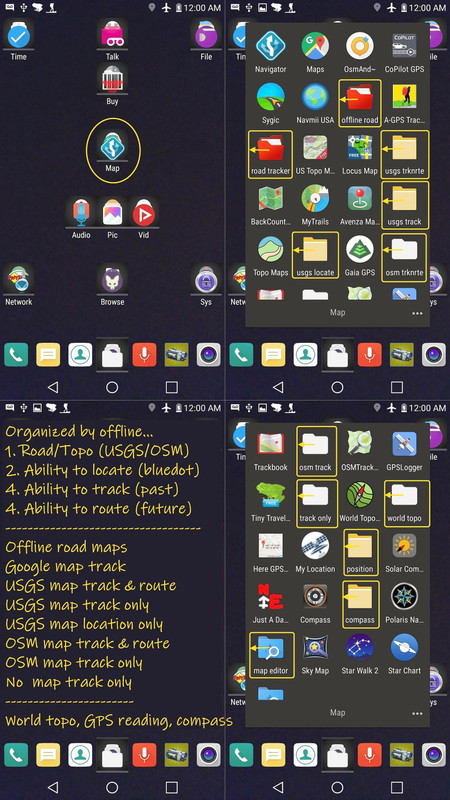
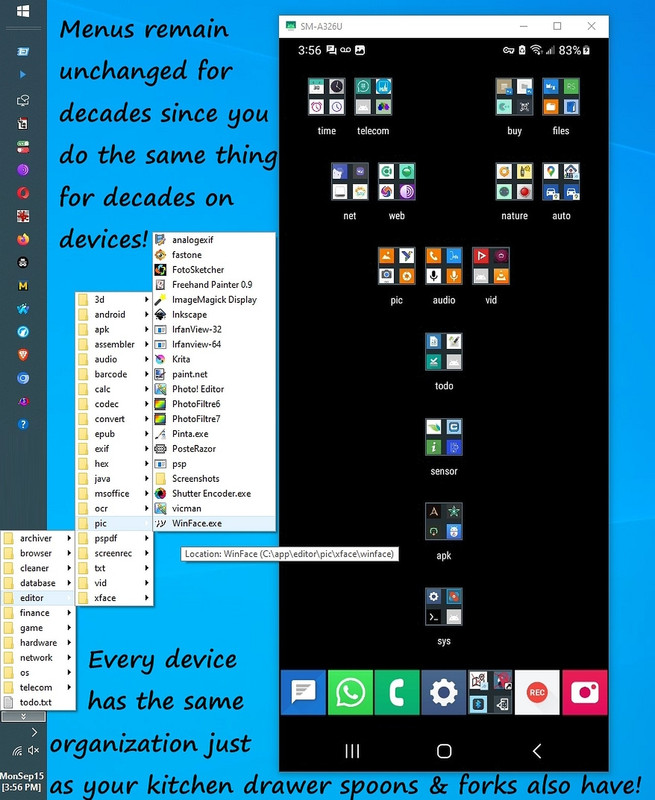
    Once per decade, or so, I invest an inordinate amount of energy organizing
    my phone and my PC (since what I do on them is pretty much the same stuff).
    <https://i.postimg.cc/pLFpXfMP/maps07.jpg>

    I only have to do that once, per decade (or so) for the PC and for Android.
    <https://i.postimg.cc/fW38dhsX/android-windows-menus.jpg>
    Since every phone automatically gets the same homescreen organization.

    I got a free Samsung Galaxy A32-5G from T-Mobile in 2021 and within two
    years, I broke it twice so T-Mobile replaced it under warranty twice.

    I even doubled my sd card size a couple of times, all seamlessly so.
    (Of course, I format it on Windows to the same name of 0000-0001.)

    Without the cloud, without an account, I backed up & restored almost everything, but I did lose text messaging history, as I recall, although as
    I noted to Carlos, had I created a free account on the pulsesms web site, I could have saved them (and I'm sure Google backups save them for others).

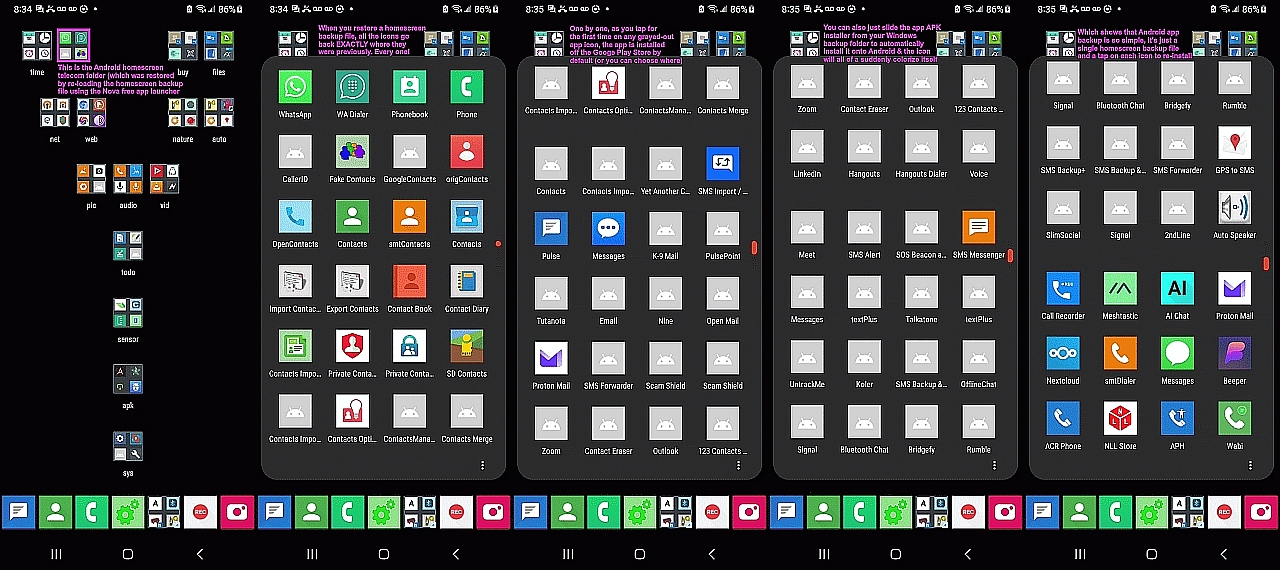
    Each time, I simply pulled out my external sd card, and then put it in the
    new device. I simply reloaded my homescreen backup file, which had gray
    icons for every app that wasn't yet installed (which was most apps).
    <https://i.postimg.cc/Kv8RmGT3/telecom.jpg>

    If I wanted to, I could just tap on the gray icons, and that immediately
    tried to get from the Google Play Store the *latest* version of that app.

    But since I didn't want the latest version, and since I download apps from F-Droid or GitHub, I simply doubleclicked on the APKs that I saved.

    Saved APKs?
    Yup.

    For Google Play store APKs?
    Yup.

    Almost nobody does it.
    Almost nobody even knows how to do it.

    But I save the APK of every app BEFORE I install that app.
    So I have all the APKs for all the apps I have installed (and not deleted).

    Of course, I don't remember all the apps I've installed.
    But I don't have to remember them.

    That's what the homescreen backup file does for me.
    Most of the work is in re-installing a thousand apps.

    But not for me.
    --- Synchronet 3.22a-Linux NewsLink 1.2
  • From Carlos E.R.@[email protected] to comp.mobile.android on Mon Jun 8 09:47:57 2026
    From Newsgroup: comp.mobile.android

    On 2026-06-08 01:45, Alan Peeling wrote:
    On 07/06/2026 22:09, Carlos E.R. wrote:
    On 2026-06-07 20:57, Alan Peeling wrote:
    On 07/06/2026 13:32, Carlos E.R. wrote:
    On 2026-06-07 13:46, Alan Peeling wrote:
    On 05/06/2026 12:33, Carlos E.R. wrote:


    The thing is, only two things are of interest to me in the backup:
    photos/videos, and WhatsApp. The rest, I can just reinstall. Ok,
    SMSs too.


    The thing is, only two things are of interest to me in the backup:
    photos/videos, and WhatsApp. The rest, I can just reinstall. Ok,
    SMSs too.

    I'd like to have a fairly painless means of recovering from a factory
    reset, should the need arise.

    Can't be done. There is no simple way to take a phone or tablet that
    has been reset to factory state, and recover from a full backup on a
    disk or computer. I don't know about hard ways, either.

    I think I know how to recover whatsapp.

    Restore the phone, make sure whatsapp is not installed yet. If it is,
    don't tap on it. Recover all the whatsapp files, its entire tree, and
    then start whatsapp. Maybe, just maybe, it sees the files and uses
    them. I did this once, long ago, and it worked. I don't know about now.


    I'd like to have a fairly painless means of recovering from a factory
    reset, should the need arise.

    Can't be done. There is no simple way to take a phone or tablet that
    has been reset to factory state, and recover from a full backup on a
    disk or computer. I don't know about hard ways, either.
    I think I know how to recover whatsapp.
    Restore the phone, make sure whatsapp is not installed yet. If it is,
    don't tap on it. Recover all the whatsapp files, its entire tree, and
    then start whatsapp. Maybe, just maybe, it sees the files and uses
    them. I did this once, long ago, and it worked. I don't know about now.

    How about copying everything from an old phone to a new one in one operation?


    When, how?

    When you take out a new phone from the box, you can not just power it up
    and start cloning stuff from the backup. No, the thing starts posing
    questions to you. Country, language, Wifi password, and google account.
    Plug the old phone via cable. Alternatively, recover from cloud backup?

    There is no exit from the questions to start recovering from backup instead.

    True, I have not done experiments to try to find a method, maybe it does exist.


    The closest I have seen is connect working old phone to new one via
    cable, and the automated initial procedure copies everything it wants
    instead of using the cloud backup. But the automated procedure has the control, not you.
    --
    Cheers, Carlos.
    ESđŸ‡Ș🇾, EUđŸ‡ȘđŸ‡ș;
    --- Synchronet 3.22a-Linux NewsLink 1.2
  • From Carlos E.R.@[email protected] to comp.mobile.android on Mon Jun 8 13:11:12 2026
    From Newsgroup: comp.mobile.android

    On 2026-06-07 14:32, Carlos E.R. wrote:

    ...

    One of these days I'm going to do a backup of my phone, and I'll post in this thread what I find.

    I think it is the FTP server in Cx File Explorer in Android and
    Filezilla on the computer (Linux in my case)

    (https://play.google.com/store/apps/details? id=com.cxinventor.file.explorer)


    The thing is, only two things are of interest to me in the backup: photos/videos, and WhatsApp. The rest, I can just reinstall. Ok, SMSs too.

    I just did a backup using Cx File Explorer in the phone and Filezilla on
    the computer.

    /2025-07-18-test │ 56170M│Jan 1 1970 /2026-06-08-cx-ftp │ 28062M│Jun 8 12:22

    As you can see, the "test" tree copied many more things. The difference
    is in the Android/data/* directory, many things are missing. Today I saw
    a bunch of messages on filezilla that it could not list this directory
    or that:

    Command: CWD /device/Android/data
    Response: 250 CWD OK
    Command: CWD rtve.tablet.android
    Response: 550 CWD to the invalid path
    Error: Failed to retrieve directory listing
    Status: Retrieving directory listing of "/device/Android/data/rtve.tablet.android"...
    Command: CWD /device/Android/data
    Response: 250 CWD OK
    Command: CWD rtve.tablet.android
    Response: 550 CWD to the invalid path
    Error: Failed to retrieve directory listing


    So, there is a method out there that I used to create that
    "2025-07-18-test" backup that copied all that, but I don't remember what
    it was, my notes do not say. I have a guess what it would be, but I can
    not test it till I reboot the machine.
    --
    Cheers, Carlos.
    ESđŸ‡Ș🇾, EUđŸ‡ȘđŸ‡ș;
    --- Synchronet 3.22a-Linux NewsLink 1.2
  • From Maria Sophia@[email protected] to comp.mobile.android on Mon Jun 8 10:51:35 2026
    From Newsgroup: comp.mobile.android

    Carlos E.R. wrote:
    The difference is in the Android/data/* directory, many things are missing.

    I have been doing backup since forever, but I looked up what the
    current state of affairs is, so this is from my search results only.

    As noted, without root, with later Android versions, getting data out of protected sandboxed storage is, well, it's nigh near likely impossible.

    Most people, as we all know, would use Google's marketed method to backup
    and restore an old phone to a new phone, but there may be a better way.

    If they're lucky, they can use an OEM's preferred backup method too.
    a. Samsung Smart Switch (PC backup)
    b. Pixel Switch
    c. Motorola Rescue and Smart Assistant
    d. Xiaomi Mi Mover / Mi PC Suite / Oppo / OnePlus
    e. Huawei HiSuite

    Assuming non root, non cloud, non account, non Google backup of an old
    phone to a new phone is the given problem set, I'd mostly use ADB to do it.
    *How to save and restore data on Android without root: ADB, Google*
    <https://en.androidayuda.com/save-restore-android-data-without-root/>
    Use ADB backup (adb backup -apk -shared -all -f backup.ab) for apps
    and app data and shared storage, then supplement with local-backup
    apps for SMS, call logs and settings (such as Wi-Fi settings).

    I haven't tried "coolmuster" on the PC, but here's a shill on it:
    <https://www.coolmuster.com/android/android-backup-without-root.html>

    There is also local syncing which can be done on a schedule such as
    a. Syncthing <https://syncthing.net/>
    b. Local FTP/SMB servers (e.g., using CX File Explorer, Solid Explorer
    or Mixplorer)

    Apparently for text & media, a quick search indicates we can use
    a. SMS Backup & Restore
    <https://play.google.com/store/apps/details?id=com.riteshsahu.SMSBackupRestore>
    b. NeoBackup + Shizuku
    <https://github.com/NeoApplications/Neo-Backup>
    c. Muntashirakon has a backup mechanism that backs up data on old Androids
    But I don't really trust any of them with the later Android versions.

    Of course, any good database app will have an import/export feature
    which will read/write standard databases, such as those for
    a. Contacts > vcf
    b. Calendar > ics
    c. Finance > csv
    What else matters in terms of user databases?

    All this is just from a quick set of searches, where adb backup, last I
    tried it, was disappointing as apps can opt out of adb backup and scoped storage blocks direct access to /Android/data & /Android/obb folders.

    I don't need this command because I save all APKs before I install them.
    adb backup -apk -shared -all -f backup.ab
    But that command "should" get all the APKs off the phone to the PC.

    Caveat: I haven't recently tested these and every later Android version
    after around Android 11 makes them work less and less without being root.
    --
    When we pool our knowledge, all of us can learn from each other.
    --- Synchronet 3.22a-Linux NewsLink 1.2
  • From Carlos E.R.@[email protected] to comp.mobile.android on Mon Jun 8 21:19:21 2026
    From Newsgroup: comp.mobile.android

    On 2026-06-08 18:51, Maria Sophia wrote:
    Carlos E.R. wrote:
    The difference is in the Android/data/* directory, many things are missing.

    I have been doing backup since forever, but I looked up what the
    current state of affairs is, so this is from my search results only.

    As noted, without root, with later Android versions, getting data out of protected sandboxed storage is, well, it's nigh near likely impossible.

    Most people, as we all know, would use Google's marketed method to backup
    and restore an old phone to a new phone, but there may be a better way.

    If they're lucky, they can use an OEM's preferred backup method too.
    a. Samsung Smart Switch (PC backup)
    b. Pixel Switch
    c. Motorola Rescue and Smart Assistant

    My phones are Motorola, and my new tablet is Lenovo. I'm not familiar
    with this tool, unless it is the thing that runs on first boot.
    --
    Cheers, Carlos.
    ESđŸ‡Ș🇾, EUđŸ‡ȘđŸ‡ș;
    --- Synchronet 3.22a-Linux NewsLink 1.2
  • From Carlos E.R.@[email protected] to comp.mobile.android on Mon Jun 8 21:33:35 2026
    From Newsgroup: comp.mobile.android

    On 2026-06-08 13:11, Carlos E.R. wrote:
    On 2026-06-07 14:32, Carlos E.R. wrote:

    ...


    So, there is a method out there that I used to create that "2025-07-18- test" backup that copied all that, but I don't remember what it was, my notes do not say. I have a guess what it would be, but I can not test it till I reboot the machine.

    Found it, my guess was right. It has been my default method for years,
    so that is why I did not write it down.

    It uses Linux. I connect the phone to the computer via USB cable, then
    tap on the phone to share all files (not just photos). Then on the
    computer I open the phone using Thunar (a file browser for XFCE).

    Then I open in a terminal Midnight Commander (mc), and navigate to:

    /run/user/1000/gvfs/mtp:host=motorola_moto_g52_redacted/Almacenamiento
    interno compartido

    and copy the tree wherever I want.

    It runs at about 10..12 MB/s


    I assume that you can do the same using KDE/Plasma (Dolphin) but the
    details change.
    --
    Cheers, Carlos.
    ESđŸ‡Ș🇾, EUđŸ‡ȘđŸ‡ș;
    --- Synchronet 3.22a-Linux NewsLink 1.2
  • From Maria Sophia@[email protected] to comp.mobile.android on Mon Jun 8 20:40:24 2026
    From Newsgroup: comp.mobile.android

    Carlos E.R. wrote:
    c. Motorola Rescue and Smart Assistant

    My phones are Motorola, and my new tablet is Lenovo. I'm not familiar
    with this tool, unless it is the thing that runs on first boot.

    My last Motorola was the Moto G that Google Fi gave me for $100 years ago.

    Here's the European site on the Motorola Rescue & Smart Assistant tool.
    <https://en-emea.support.motorola.com/app/answers/detail/a_id/161942/p/11325>

    I'm not sure why they even have a USA site that seems the same though.
    <https://en-us.support.motorola.com/app/answers/detail/a_id/161942/p/11138>

    Bear in mind it only backs up your media and contacts and the like.
    a. It does NOT back up apps or app data.
    b. It requires a Windows PC (Windows 7/10/11).
    c. The backup is encrypted (but you give it the password)

    It's mainly intended for use before a software repair or factory reset.
    Dunno how well it works though.
    --- Synchronet 3.22a-Linux NewsLink 1.2
  • From Carlos E.R.@[email protected] to comp.mobile.android on Tue Jun 9 20:04:17 2026
    From Newsgroup: comp.mobile.android

    On 2026-06-09 04:40, Maria Sophia wrote:
    Carlos E.R. wrote:
    c. Motorola Rescue and Smart Assistant

    My phones are Motorola, and my new tablet is Lenovo. I'm not familiar
    with this tool, unless it is the thing that runs on first boot.

    My last Motorola was the Moto G that Google Fi gave me for $100 years ago.

    Here's the European site on the Motorola Rescue & Smart Assistant tool.
    <https://en-emea.support.motorola.com/app/answers/detail/a_id/161942/p/11325>

    (the page tries to switch me to the Spain site)


    I'm not sure why they even have a USA site that seems the same though.
    <https://en-us.support.motorola.com/app/answers/detail/a_id/161942/p/11138>

    Bear in mind it only backs up your media and contacts and the like.
    a. It does NOT back up apps or app data.
    b. It requires a Windows PC (Windows 7/10/11).
    c. The backup is encrypted (but you give it the password)

    It's mainly intended for use before a software repair or factory reset.
    Dunno how well it works though.

    Well, if it is Windows only, I can't easily use it.

    I'll save the link, thanks, for the occasion.


    Whastapp saves its things to ".../Android/media/com.whatsapp", but some
    do under ".../Android/data/", like for instance:

    /au.com.shiftyjelly.pocketcasts 16626M (podcasts) /com.google.android.apps.maps 83037K (cache)
    /com.mobialia.gas.spain 14620K (map_cache.db) /com.pixlr.express 101696K (working files)
    /com.wallapop 33446K (photos)
    /com.xiaomi.wearable 75163K (logs)
    /es.bancosantander.apps 15186K (photo uploads) /net.osmand.plus 16933M (several)
    /org.videolan.vlc 17901K (jpgs?)

    (only the biggest users, there are many more)

    This entire directory is missed when doing a backup by FTP.
    --
    Cheers, Carlos.
    ESđŸ‡Ș🇾, EUđŸ‡ȘđŸ‡ș;
    --- Synchronet 3.22a-Linux NewsLink 1.2
  • From Maria Sophia@[email protected] to comp.mobile.android on Tue Jun 9 12:41:13 2026
    From Newsgroup: comp.mobile.android

    Carlos E.R. wrote:
    This entire directory is missed when doing a backup by FTP.

    Bummer that the Motorola tool apparently only works on Windows.
    Sorry about that. I could be wrong though, so doublecheck it, as it seems
    to work on macOS which usually (often?) means it can also work with Linux.

    I noticed two things doing that research for you, one of which I've been noticing for the past year or two, which is that almost everything on the
    net about Android backup is outdated by each new Android release.

    Starting around Android 11, each new Android release seems to have added
    more and more protection, such that almost everything out there is wrong.

    I found this out the hard way when I was valiantly trying to get
    Muntashirakon App Manager's "back up apk" menu to work on Android 13.

    Given we all know and respect Muntashirakon, I was not, at first, willing
    to believe that the "Backup APK" (as opposed to "Save APK") wouldn't work.

    I tried valiantly simply because I couldn't believe Muntashirakon had a
    menu that didn't work, so I even added Shizuku to the mix, to no avail.

    I tried for hours, and finally gave up, where we could blame Muntashirakon,
    but not really since no non-root app can defeat Android permissions.

    Luckily, the Muntashirakon "Save APK" menu works beautifully, but what's different is the "Backup APK" menu also saved the app's data along with it.

    My main point, in summary, is what used to work, no longer works, and therefore, much of what is on the Internet is wrong for app-data backup.
    --
    When we pool our knowledge, all of us can learn from each other.
    --- Synchronet 3.22a-Linux NewsLink 1.2
  • From Carlos E.R.@[email protected] to comp.mobile.android on Tue Jun 9 22:26:22 2026
    From Newsgroup: comp.mobile.android

    On 2026-06-09 20:41, Maria Sophia wrote:
    Carlos E.R. wrote:
    This entire directory is missed when doing a backup by FTP.

    Bummer that the Motorola tool apparently only works on Windows.
    Sorry about that. I could be wrong though, so doublecheck it, as it seems
    to work on macOS which usually (often?) means it can also work with Linux.

    I did not notice a download link. :-?


    I noticed two things doing that research for you, one of which I've been noticing for the past year or two, which is that almost everything on the
    net about Android backup is outdated by each new Android release.

    Starting around Android 11, each new Android release seems to have added
    more and more protection, such that almost everything out there is wrong.

    I found this out the hard way when I was valiantly trying to get Muntashirakon App Manager's "back up apk" menu to work on Android 13.

    Given we all know and respect Muntashirakon, I was not, at first, willing
    to believe that the "Backup APK" (as opposed to "Save APK") wouldn't work.

    I tried valiantly simply because I couldn't believe Muntashirakon had a
    menu that didn't work, so I even added Shizuku to the mix, to no avail.

    I tried for hours, and finally gave up, where we could blame Muntashirakon, but not really since no non-root app can defeat Android permissions.

    Luckily, the Muntashirakon "Save APK" menu works beautifully, but what's different is the "Backup APK" menu also saved the app's data along with it.

    My main point, in summary, is what used to work, no longer works, and therefore, much of what is on the Internet is wrong for app-data backup.

    Aha.
    --
    Cheers, Carlos.
    ESđŸ‡Ș🇾, EUđŸ‡ȘđŸ‡ș;
    --- Synchronet 3.22a-Linux NewsLink 1.2
  • From Dave Royal@[email protected] to comp.mobile.android on Tue Jun 9 21:57:34 2026
    From Newsgroup: comp.mobile.android

    Maria Sophia <[email protected]> Wrote in message:

    My main point, in summary, is what used to work, no longer works, and therefore, much of what is on the Internet is wrong for app-data backup.

    Indeed. When I was poking about in Android 13 the other day, I
    tried 'adb backup' which I used to use to extract app data. It
    didn't work. And it warned that backup was deprecated and was
    likely to be removed. And it was not included in 'adb
    help'.

    https://developer.android.com/about/versions/12/behavior-changes-12#adb-backup-restrictions
    --
    Remove numerics from my email address.
    --- Synchronet 3.22a-Linux NewsLink 1.2